nopAccelerate

Faster, scalable and reliable nopCommerce.

nopAccelerate Blog - Updates, News, Tips & Tricks

Why Customer Service Automation Is One of the Most Valuable AI Use Cases in eCommerce
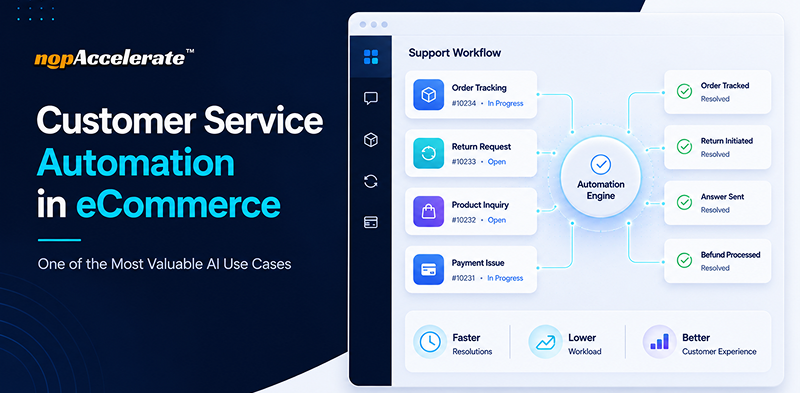
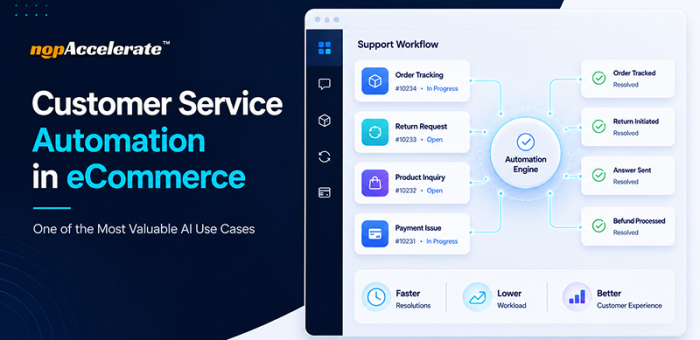
Customer service automation workflow for eCommerce support operations

In our previous blog, we explored several AI use cases shaping modern eCommerce. Here, we’ll focus on one of the most valuable and widely adopted applications: customer service automation.

Most eCommerce stores start automation the wrong way. They implement a tool expecting it to solve every support challenge, only to find customers still frustrated and support tickets still growing months later.

The problem is not automation itself. Most stores simply automate the wrong things first or choose the wrong approach.

This blog explains what customer service automation actually means in eCommerce, what support tasks are worth automating, where stores go wrong, and how to implement it effectively.

What Customer Service Automation Actually Means in eCommerce

Customer service automation is not about replacing your support team. It is about removing repetitive, low-complexity tasks so agents can focus on conversations that require human judgment and problem-solving.

In eCommerce, that repetitive workload is significant. Questions like “Where is my order?”, “What is your return policy?”, “Do you ship to my state?”, and “How long does delivery take?” make up a large share of support requests.

These questions do not require experience or empathy. They require accurate information delivered instantly, which is exactly what automation is built for.

According to Salesforce, AI already resolves about 30% of customer service cases as of 2026, and that number is expected to hit 50% by 2027. That is not a future trend. It is already happening in stores that have identified the right support processes to automate.

Why Customer Service Became One of the First AI Investments in eCommerce

AI is transforming every area of eCommerce, from personalization and product discovery to inventory management and pricing. Yet customer service remains one of the first places businesses invest in AI.

The reason is simple. Customer support directly affects both customer experience and operational efficiency. Every unanswered question impacts the customer, while every support ticket adds pressure to the business.

Unlike many AI initiatives that take time to show results, customer service automation often delivers value quickly. It helps businesses reduce response times, handle repetitive inquiries at scale, and free support teams to focus on more complex conversations.

For many eCommerce companies, it is often the first step in their AI journey.

The Three Layers of Customer Service Automation in eCommerce

Before automating customer support, it helps to understand how support requests typically break down. Most eCommerce interactions fall into three distinct layers.

Layer One: Routine Information Queries

These are questions with clear, factual answers, such as shipping timelines, return policies, payment methods, order status, product availability, and size guides.

These queries can be answered instantly and accurately through automation, allowing support teams to focus on more valuable work.

Layer Two: Product Discovery and Guidance

This layer is more complex. A shopper searching for “waterproof boots for construction work under $80” needs a relevant product recommendation, not a link to a category page.

To handle these requests, the automation system must understand intent and search product data in real time. Basic automation tools often struggle here, while AI-powered solutions connected to your product catalog can provide meaningful answers.

Layer Three: Complex and Emotional Conversations

Some situations still require human involvement. A damaged order, a custom B2B request, or a frustrated customer after a delivery issue often needs empathy, judgment, and problem-solving.

The goal of automation is not to replace these conversations. It is to remove routine requests so support teams can focus on the interactions that matter most.

Why Customer Service Automation Is One of the Most Valuable AI Use Cases in eCommerce

For most eCommerce businesses, customer service automation solves a challenge that already exists: growing support volume.

Unlike AI initiatives that focus on a single function, customer service automation impacts multiple business goals at once:

  • Faster customer response times
  • Lower operational costs
  • Improved support efficiency
  • Better customer experiences
  • Greater scalability as the business grows

That is why customer service automation is often one of the first AI investments businesses make and one of the easiest to measure.

Where Most eCommerce Stores Go Wrong With Automation

Stores that struggle with customer service automation usually make one of three common mistakes.

Mistake One: Choosing a Rule-Based Bot and Calling It Automation

There is a significant difference between a rule-based chatbot and an AI-powered support tool.

Rule-based bots rely on keywords and scripted responses. If a customer phrases a question differently, the bot often fails to understand the request, creating a frustrating experience.

AI-powered tools work differently. They understand intent, allowing them to recognize that “Can I get my money back if I do not like it?” and “What is your refund policy?” are asking the same thing.

Chatbot industry research shows that 88% of people used a chatbot in the past year, and over 80% had a positive experience. However, many businesses still rely on rule-based systems that often fall short of customer expectations.

Mistake Two: Automating Without Connecting to Store Data

A chatbot that cannot access store data is little more than a FAQ page with a chat window.

For automation to work in eCommerce, it must connect to product catalogs, inventory systems, order management platforms, and store policies. Without those connections, responses remain generic and often unhelpful.

Whether a customer is asking about a product, an order, or current inventory, access to real store data is what makes automation useful.

Mistake Three: Setting It Up Once and Walking Away

Customer service automation is designed to reduce manual work, not create more of it.

However, stores still need to review and update their automation periodically as products, policies, and customer questions change. In most cases, a monthly or quarterly review is enough to keep responses accurate and relevant.

If automation is never updated, response quality can gradually fall behind the business it is meant to support.

What Customer Service Automation Gets Right When Done Properly

When customer service automation is implemented with the right tools and integrations, the results are measurable.

According to Gartner, the average cost of a human agent interaction is $6.00, compared to $0.50 for an AI chatbot interaction. Studies also show that businesses using AI for customer service reduce support costs by an average of 30%.

For most eCommerce businesses, however, the bigger advantage is response time.

88% of customers expect faster responses than they did a year ago. Automation helps businesses meet those expectations by resolving routine inquiries instantly, regardless of support hours.

For example, a shopper visiting your store late at night may have a question about returns before completing a purchase. Instead of waiting until the next business day, they receive an immediate answer and can continue their buying journey.

The Types of Queries That Are Ready to Automate Right Now

The most successful automation projects start with the right types of customer inquiries.

Policy and Store Information

Return policies, refund timelines, shipping costs, delivery windows, payment methods, business hours, and contact details are ideal candidates for automation because the answers are consistent and rarely change.

Product and Catalog Questions

A shopper searching for “women’s running shoes in size 8” needs a relevant answer, not a category page.

Connected to product data, AI can handle product searches, specification questions, compatibility checks, and recommendations in real time. This improves product discovery while reducing support workload.

Order Status for Logged-In Customers

Order tracking is one of the most common support requests and one of the easiest to automate.

Customers should be able to ask “Where is my order?” and receive a real-time answer pulled directly from their account without requiring agent involvement.

Frequently Asked Questions

Sizing guides, care instructions, product compatibility, and other fact-based questions are ideal candidates for automation, freeing support teams to focus on more complex inquiries.

How to Figure Out What to Automate First in Your Store

Start by reviewing the last 30 days of support tickets or customer emails.

Most eCommerce businesses find that a small number of recurring questions generate the majority of support volume. In many cases, five or six topics account for 60% to 70% of all inquiries. Those are your best automation opportunities.

If the most common questions involve shipping, returns, policies, or order status, they can often be automated immediately. If product discovery questions are common, choose a solution that can access your catalog and understand natural language.

Once automation is live, review conversations periodically to identify gaps and improve responses. Businesses that achieve long-term success make small adjustments over time as customer questions, products, and policies evolve.

Conclusion

Automation is not a shortcut. It is a smarter way to run support. When you automate the right queries with the right tool, your team works better, your customers wait less, and your store runs smoother around the clock.

Next up, how AI chatbots specifically handle eCommerce customer support, what they can actually do inside your store, and what to look for before you choose one.
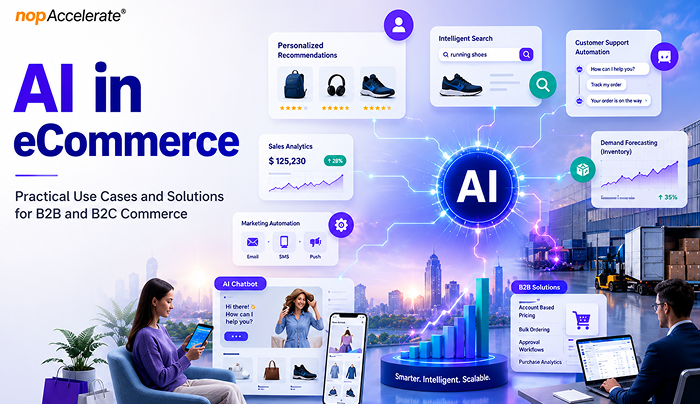
AI in eCommerce: Practical Use Cases and Solutions for B2B and B2C Commerce

AI powering search, pricing, inventory, and customer experiences

Artificial intelligence has quickly moved from a competitive advantage to a business necessity in eCommerce.

Retailers face rising customer acquisition costs, growing customer expectations, and increasing operational complexity. Meanwhile, shoppers expect fast product discovery, personalized experiences, accurate inventory visibility, seamless support, and frictionless checkout across every channel. Businesses that fail to meet these expectations risk losing customers to competitors that can.

This is where AI is creating measurable value. From product recommendations and search optimization to demand forecasting and fraud prevention, AI helps businesses improve customer experiences while increasing operational efficiency.

According to McKinsey, AI-powered personalization can help leading organizations generate up to 40% more revenue from those activities than slower-moving competitors. Yet many businesses struggle because they focus on AI tools before identifying clear objectives and high-impact use cases.

This guide explores where AI delivers the greatest value across the eCommerce journey and how businesses can adopt it strategically.

What AI in eCommerce Actually Means

When people hear AI, they often think of chatbots or content creation tools. In reality, AI supports many more eCommerce activities.

At its core, AI helps businesses analyze large amounts of data, spot patterns, make predictions, and automate tasks that would otherwise take significant time and effort.

Several technologies make this possible:

  • Machine learning for forecasting, recommendations, and fraud detection
  • Natural language processing (NLP) for search and customer support
  • Computer vision for image recognition and visual search
  • Generative AI for content creation and communication
  • AI agents that can perform tasks with minimal human input

AI adoption continues to grow because businesses now collect more customer, product, and business data than ever before. AI helps turn that data into actions that improve efficiency, customer experience, and revenue.

Rather than replacing people, AI helps teams save time, reduce manual work, uncover useful insights, and make better decisions.

Where AI Creates Value Across the eCommerce Business

Personalization and Customer Experience

Personalization is one of the most valuable uses of AI in eCommerce industry.

Customers no longer respond well to generic shopping experiences. They expect brands to understand their preferences, buying behavior, and interests. AI makes this possible by analyzing browsing activity, purchase history, and customer behavior.

For example, a customer who regularly buys fitness products may see different recommendations and promotions than someone shopping for home décor. The goal is to help customers find relevant products faster.

Common personalization use cases include:

  • Product recommendations
  • Customer segmentation
  • Dynamic promotions
  • Personalized email campaigns
  • Loyalty program optimization
  • Customer lifetime value prediction
  • Churn detection
  • Localized shopping experiences
  • Dynamic website content

Personalization does more than improve conversion rates. It can increase average order value, improve customer retention, and strengthen customer relationships.

Search and Product Discovery

Product discovery has become one of the most important areas in eCommerce.

Customers often know what problem they want to solve but struggle to describe it using product-specific terms. Traditional keyword search can fail because it matches words rather than understanding intent.

For example, a customer searching for “comfortable shoes for standing all day” is looking for a solution, not a category page.

AI-powered search helps bridge that gap by understanding context, customer behavior, and search intent.

Applications include:

  • Semantic search
  • Visual search
  • Voice search
  • Product comparison assistance
  • Guided selling experiences
  • Search result optimization
  • Automated product tagging
  • Personalized search experiences

Poor search experiences often lead to higher bounce rates and abandoned shopping sessions. Better search helps customers find the right products faster, reducing friction throughout the buying journey.

Customer Service and Support Automation

Customer support is often one of the first areas where retailers invest in AI because it improves both customer experience and operational efficiency.

Support teams spend a large amount of time answering repetitive questions about orders, deliveries, returns, refunds, product availability, and account information. While important, many of these interactions follow predictable patterns.

AI can automate routine support tasks, allowing human agents to focus on situations that require empathy, judgment, or complex problem-solving.

Common applications include:

  • Order tracking and delivery updates
  • Returns and refund assistance
  • Customer self-service portals
  • Product discovery and recommendations
  • Knowledge-based customer assistance
  • Post-purchase order support
  • Smart follow-up conversations

The benefits go beyond cost savings. Faster responses improve customer satisfaction and reduce frustration throughout the customer journey.

Many retailers are also adopting customer service automation to deliver faster and more consistent support experiences. Customers can quickly access answers to common product, order, and policy questions without waiting for assistance.

This helps businesses create more responsive support operations while reducing pressure on internal teams.

Inventory, Supply Chain, and Operations

Inventory management remains one of the biggest challenges in eCommerce.

Stock too much inventory and cash gets tied up in unsold products. Stock too little and businesses risk lost sales, unhappy customers, and damaged trust. AI helps reduce this uncertainty.

By analyzing sales patterns, seasonal trends, inventory levels, supplier performance, and market signals, AI can improve forecasting accuracy and support better planning.

Common operational applications include:

  • Demand forecasting
  • Inventory optimization
  • Automated replenishment
  • Warehouse allocation
  • Returns forecasting
  • Supply chain visibility
  • Order orchestration
  • Fulfillment optimization

Research from McKinsey has found that organizations using AI in supply chain operations have reported improvements in logistics efficiency, inventory management, and service performance.

For retailers, these improvements can lead to lower operating costs, fewer stockouts, and better customer experiences.

Pricing, Revenue Optimization, and Fraud Prevention

Pricing decisions have always required balancing profitability and competitiveness.

The challenge is that market conditions constantly change. Competitor pricing, inventory levels, customer demand, and promotions can all influence pricing decisions. AI helps businesses respond faster.

Instead of relying entirely on manual analysis, pricing engines can continuously evaluate market conditions and recommend pricing changes based on business goals.

Common revenue optimization applications include:

  • Dynamic pricing
  • Promotional optimization
  • Competitor price monitoring
  • Markdown management
  • Revenue forecasting
  • Margin optimization

AI is also becoming increasingly important for fraud prevention.

As online transactions grow, so do fraud risks. Traditional rule-based systems often struggle to keep up with more sophisticated threats.

AI helps identify suspicious activity by analyzing transaction patterns, customer behavior, device activity, and account history in real time.

Key security applications include:

  • Fraud detection
  • Payment risk analysis
  • Account takeover prevention
  • Return fraud monitoring
  • Transaction monitoring

The result is stronger security without adding unnecessary friction for legitimate customers.

Content, Marketing, and the Rise of Agentic Commerce

Content has become a major challenge for growing eCommerce businesses.

Every new product requires descriptions, metadata, category content, promotional messaging, emails, social media assets, and ad copy. As product catalogs grow, managing content at scale becomes increasingly difficult.

AI helps retailers create and optimize content faster while maintaining consistency across channels.

Common applications include:

  • Product description generation
  • Product attribute enrichment
  • SEO metadata creation
  • Email campaign development
  • Ad copy generation
  • Social media content support
  • Customer review analysis
  • Sentiment monitoring
  • Trend identification
  • Marketing performance insights

The biggest value is not replacing content teams but helping them work more efficiently. For example, retailers can use AI to generate initial product content while teams focus on quality control and brand alignment.

Another emerging area is agentic commerce.

Unlike traditional AI systems that wait for instructions, AI agents can work toward defined goals by analyzing information, making recommendations, and completing tasks with limited human input.

Potential applications include:

  • Autonomous pricing optimization
  • Inventory management assistance
  • Marketing campaign optimization
  • Product merchandising recommendations
  • Customer support workflow automation

While still in the early stages, agentic AI is expected to play a larger role in commerce operations in the years ahead.

How B2B and B2C eCommerce Use AI Differently

Although the underlying technology may be similar, B2B and B2C organizations often use AI to solve different business challenges.

The difference lies in buying behavior, decision-making processes, and business objectives.

AreaB2B eCommerceB2C eCommerce
Buying JourneyLonger and multi-stepFaster and more transactional
Decision MakersMultiple stakeholdersIndividual shoppers
PersonalizationAccount-basedIndividual-based
Average Order ValueHigherLower
Primary ObjectiveEfficiency and account growthConversion and customer experience
Key AI FocusAutomation and forecastingPersonalization and engagement

How B2B Companies Use AI

B2B commerce involves longer sales cycles, multiple stakeholders, and complex purchasing processes. AI helps improve efficiency through lead qualification, procurement forecasting, order automation, pricing optimization, and workflow support.

How B2C Companies Use AI

B2C retailers use AI to enhance customer experiences through personalization, product recommendations, visual search, dynamic pricing, cart recovery, and customer service automation that improves engagement and conversions.

Recommended AI Solutions for B2B and B2C eCommerce

Not every AI solution delivers the same value. The best approach is to prioritize solutions that align with your customers, business goals, and operational challenges.

For B2B eCommerce

B2B organizations typically benefit from AI solutions that simplify complex purchasing processes and improve efficiency.

Priority solutions:

  • Account-based personalization
  • RFQ and quote automation
  • Intelligent product catalogs
  • Demand forecasting
  • Sales support and lead intelligence

These solutions help streamline operations, improve buyer experiences, and support account growth.

For B2C eCommerce

B2C retailers often achieve the strongest results from AI solutions that improve product discovery, engagement, and conversions.

Priority solutions:

  • Personalized recommendations
  • AI-powered search
  • Customer service automation
  • Dynamic pricing
  • Cart recovery campaigns

These capabilities help customers find products faster and create more relevant shopping experiences.

Conclusion

AI is creating value across both B2B and B2C eCommerce, but success depends on applying the right solutions to the right business challenges. Organizations that focus on practical use cases, measurable outcomes, and customer needs are more likely to improve efficiency, enhance experiences, and achieve sustainable growth with AI.

The Ultimate nopCommerce Development Guide for Scalable, Future-Ready eCommerce

nopCommerce development guide for scalable future-ready eCommerce solutions

eCommerce is no longer just about launching an online store. By 2026, digital commerce is projected to reach $6.4 to $6.9 trillion, growing around 7–8% annually. But the real shift is not only growth, it’s rising complexity. Businesses now operate across multiple channels, regions, customer types, and connected systems, making basic plug-and-play platforms increasingly restrictive.

Modern commerce requires more than templates and apps. Companies need platforms that support custom pricing, B2B workflows, ERP and CRM integrations, AI-driven personalization, performance at scale, and cloud-ready deployment. In short, eCommerce systems must function as long-term digital infrastructure, not just storefront software.

Built on ASP.NET Core and designed for full customization, nopCommerce enables businesses to build high-performance commerce systems without platform dependency or recurring licensing limits.

If you are evaluating nopCommerce development, this guide explains the features, technology stack, development process, costs, challenges, and future growth potential that matter.

What is nopCommerce?

nopCommerce is an open-source eCommerce platform built on ASP.NET Core and designed for businesses that need flexibility and customization without recurring platform licensing fees.

Launched in 2008, nopCommerce has evolved into one of the most mature .NET-based eCommerce platforms in the market. It is widely used by startups, SMBs, and enterprise-level businesses that require:

  • Full control over source code
  • Custom workflows
  • Advanced B2B capabilities
  • Multi-store management
  • Scalable architecture

Unlike SaaS platforms, where businesses operate within predefined limitations, nopCommerce allows complete ownership and customization of the online store. Instead of forcing companies to adjust their operations to platform constraints, it enables developers to shape the system around the business.

Why nopCommerce Matters in Modern eCommerce

Today’s businesses operate in a fast-changing digital environment where customer expectations, operational complexity, and technology demands continue to grow. As companies expand across markets and customer segments, they need ecommerce platforms that can adapt, integrate, and scale without forcing major system changes every few years.

Modern businesses demand:

  • Custom pricing models
  • Complex shipping rules
  • Multi-vendor marketplace capabilities
  • B2B + B2C hybrid functionality
  • Deep system integrations
  • Built-in AI and SEO capabilities

Many SaaS platforms restrict backend flexibility, making it difficult to implement advanced workflows or connect core business systems. nopCommerce, on the other hand, provides a strong, extensible foundation that can evolve alongside business requirements.

Built on ASP.NET Core, nopCommerce offers enterprise-level stability, performance, and security, making it well-suited for long-term digital commerce strategies rather than short-term solutions.

Who Should Choose nopCommerce?

nopCommerce is not for everyone and that’s actually its strength.

It is ideal for:

  • Startups that want to avoid recurring SaaS fees and own their technology from day one.
  • SMBs that have outgrown platforms like Shopify and need deeper customization.
  • B2B businesses requiring custom pricing rules, role-based access, and quote management.
  • Marketplace owners looking to build multi-vendor systems.
  • Enterprises that need integration with ERP, CRM, accounting software, or internal systems.
  • Businesses that want full code ownership and technical freedom.

If you are looking for plug-and-play simplicity with minimal customization, a SaaS platform may be enough. But if you need flexibility and long-term scalability, nopCommerce development becomes a strong strategic choice.

For a deeper breakdown of business fit and use cases, explore our detailed guide on who nopCommerce is ideal for.

Types of eCommerce Solutions You Can Build with nopCommerce

One of the biggest advantages of nopCommerce development is its versatility. It can support a wide range of business models and commerce scenarios, making it suitable for companies with diverse operational needs.

You can build:

  • B2C retail stores
  • B2B wholesale portals
  • Multi-vendor marketplaces
  • Dropshipping platforms
  • Subscription-based stores
  • Rental product websites
  • Booking systems
  • Hybrid B2B + B2C commerce platforms

Its modular architecture allows businesses to extend functionality through plugins or custom development, ensuring the platform can evolve alongside changing business requirements.

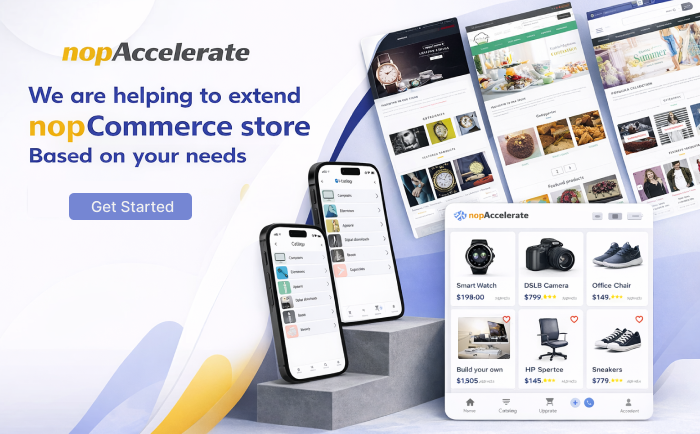
nopCommerce development services banner showcasing scalable custom eCommerce solutions

nopCommerce Technology Stack Explained

Understanding the nopCommerce technology stack is important when evaluating its scalability, performance, and long-term maintainability.

Backend

nopCommerce is built on ASP.NET Core, one of the most powerful and performance-optimized frameworks in the Microsoft ecosystem. It supports modern .NET versions, ensuring long-term maintainability and security.

Database

It primarily uses Microsoft SQL Server but can be configured with other supported database systems depending on hosting requirements.

Frontend

Built using Razor views with HTML, CSS, and JavaScript. Themes can be fully customized, allowing complete UI control.

Architecture

nopCommerce follows a plugin-based modular architecture, meaning features can be added, modified, or removed without affecting the entire system.

Hosting Options

You can deploy nopCommerce on:

  • Microsoft Azure
  • AWS
  • Dedicated cloud servers
  • On-premise infrastructure
  • Windows or Linux hosting environments

This flexibility makes nopCommerce suitable for businesses with specific infrastructure preferences.

Built-in nopCommerce Features That Support Advanced Development

nopCommerce includes a wide range of built-in features that help reduce development time, lower costs, and simplify store management. These capabilities make it a strong and reliable choice for businesses investing in long-term eCommerce development.

1. Multi-Store Management

Run multiple storefronts from a single admin panel while maintaining separate catalogs and branding.

2. Multi-Vendor Marketplace

Vendors can manage products, orders, and profiles through dedicated dashboards.

3. Multi-Language and Multi-Currency Support

Supports international expansion with localization and currency configuration.

4. Advanced Catalog Management

Unlimited categories, product attributes, variants, and inventory tracking.

5. SEO Optimization Tools

Search engine-friendly URLs, meta tag management, sitemap generation, and structured navigation help improve search visibility.

6. Marketing and Discount Engine

Built-in discount rules, coupon codes, reward points, and promotional pricing.

7. Payment and Shipping Integration

Supports multiple payment gateways and custom shipping methods.

8. Role-Based Access Control

Assign different permissions to administrators and staff members.

9. Reporting and Analytics

Sales reports, order statistics, and customer insights for performance monitoring.

10. Modern AI-Driven Tools

AI-assisted content generation and SEO support streamline catalog publishing.

11. B2B Workflow Enhancements

Native Request-For-Quote (RFQ) and quote management capabilities support hybrid B2B + B2C commerce without plugins.

12. Navigation and UX Upgrades

Features like mega menus and multiple wishlists improve storefront discovery and shopper engagement.

13. Performance & Accessibility Improvements

Cloudflare Images integration, .NET 9 performance gains, and accessibility enhancements (EAA support) help stores load faster and comply with modern standards.

14. Security

Role-based permissions, SSL support, and a secure architecture based on ASP.NET Core.

Step-by-Step nopCommerce Development Process

nopCommerce development is a structured engineering process that aligns business goals, technical architecture, and long-term scalability. Below is how serious commerce projects are actually built.

Step 1: Business Discovery & Commerce Strategy

Define what the platform must support today and in the future.

Includes:

  • Business model definition (B2C, B2B, marketplace, hybrid)
  • Product structure planning (variants, bundles, subscriptions)
  • Pricing logic (tier pricing, customer-specific pricing, contracts)
  • Market positioning and competitor analysis
  • Growth roadmap (regions, multi-store, B2B expansion)

Outcome: A clear commerce blueprint guiding all development decisions.

Step 2: Technical Architecture & System Design

Plan the foundation that ensures scalability and upgrade safety.

Includes:

  • nopCommerce version strategy (4.9+ and upgrade path)
  • Plugin-based architecture planning
  • Database and performance structure
  • Hosting and DevOps planning (Azure, AWS, cloud)
  • Integration architecture (ERP, CRM, PIM, logistics)

Outcome: A future-ready technical foundation.

Step 3: UX/UI Experience Planning

Design for usability, conversion, and performance.

Includes:

  • Custom theme design or enterprise theme adaptation
  • Mobile-first interface planning
  • Optimized cart and checkout flows
  • B2B UX (quick order, bulk pricing, RFQ)
  • Performance-focused frontend design

Outcome: A conversion-ready user experience.

Step 4: Core nopCommerce Development & Customization

Build and tailor the platform to business workflows.

Includes:

  • Store configuration and setup
  • Custom plugin and extension development
  • Pricing, tax, and checkout customization
  • Payment and shipping integrations
  • Advanced search (e.g., Solr)
  • API development for mobile or headless commerce

Outcome: A commerce engine aligned with business logic.

Step 5: System Integrations & Data Synchronization

Connect nopCommerce with the broader business ecosystem.

Includes:

  • ERP and CRM integrations
  • Inventory and warehouse synchronization
  • Accounting and billing automation
  • Third-party service connections
  • Data validation and consistency checks

Outcome: Seamless system communication without data silos.

Step 6: Testing, Performance & Security Optimization

Ensure stability, speed, and protection before launch.

Includes:

  • Functional and regression testing
  • Load and performance testing
  • Caching and database optimization
  • Security hardening and access control validation
  • Technical validation and seo configuration

Outcome: A secure, high-performance production-ready store.

Step 7: Deployment, Go-Live & Monitoring

Launch with control and risk management.

Includes:

  • Production deployment
  • CDN and performance configuration
  • Monitoring, logging, and alerts
  • Backup and rollback planning
  • Post-launch validation

Outcome: A stable and controlled go-live.

Step 8: Continuous Optimization & Growth

Development does not end at launch.

Includes:

  • Performance improvements
  • Feature enhancements
  • nopCommerce version upgrades
  • Automation and AI-driven personalization
  • Ongoing integration expansion

Outcome: A platform that evolves with business growth.

Choosing the right nopCommerce development company is critical to avoid technical debt and long-term performance issues.

For official documentation and updates, refer to the nopCommerce website.

If you need support with upgrades, migration, or custom development, nopAccelerate can be your trusted technology partner.

Cost of nopCommerce Development

One of the most common questions is: How much does nopCommerce development cost?

Since the platform itself is open-source, there is no licensing fee. However, development costs depend on project complexity, customization level, and integration requirements.

Basic Store Setup

Typically ranges from $500 to $5,000, depending on customization and design.

Custom Development Projects

Can range between $10,000 and $40,000, depending on integrations and features.

Enterprise-Level Solutions

May exceed $50,000+ when involving complex architecture and third-party integrations.

Additional Costs

Hosting: $20 to $300+ per month, depending on infrastructure
Premium themes & plugins: Varies
Maintenance & support: Ongoing cost depending on scope

Compared to SaaS platforms with recurring subscription fees and transaction charges, nopCommerce offers long-term cost control and ownership.

Common Challenges in nopCommerce Development

Common challenges include:

  • Poor architectural planning that leads to upgrade complications
  • Customizations made directly in core files instead of plugin-based extensions
  • Performance issues caused by improper caching or database design
  • Integration conflicts between ERP, CRM, and third-party systems
  • SEO and technical configuration mistakes that impact long-term visibility

These risks are not platform limitations, they are execution challenges. With structured architecture, plugin-based development, and experienced oversight, they can be effectively managed.

The Future of nopCommerce Development Projects

As digital commerce becomes more connected and data-driven, nopCommerce development is shifting from basic store implementation to long-term commerce engineering.

Future nopCommerce development will focus on:

  • API-first and integration-ready architectures
  • Upgrade-safe, plugin-based customization strategies
  • Cloud-native deployments with DevOps automation
  • AI-assisted personalization and workflow automation
  • Advanced performance engineering for high-traffic and large-catalog stores
  • Multi-store and global commerce expansion strategies

The future is not about rebuilding platforms, it is about building them correctly from the start. When structured with scalability, integrations, and extensibility in mind, nopCommerce becomes more than a store.

Final Thoughts

nopCommerce is not just another eCommerce platform. It is a powerful, open-source ecommerce framework built for businesses that value flexibility, ownership, and long-term scalability.

With the right development strategy and nopCommerce technical expertise, it can support everything from growing online stores to enterprise-grade, integration-driven digital commerce ecosystems.

If long-term growth, customization, and control matter to your business, nopCommerce deserves serious consideration in your platform evaluation.

Many eCommerce platforms make you:

“Change your process to fit the tool.”

nopCommerce allows you to:

“Shape the tool to fit your process.”

When implemented correctly, it becomes more than a store; it becomes a strategic commerce foundation.

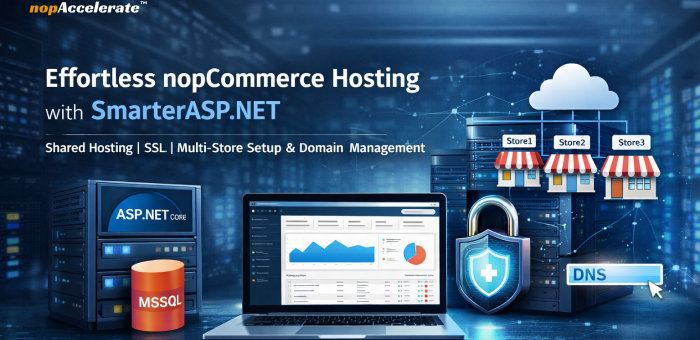
nopCommerce Hosting with SmarterASP.NET: A Practical Guide to Shared Hosting, SSL and Multi-Store Setup

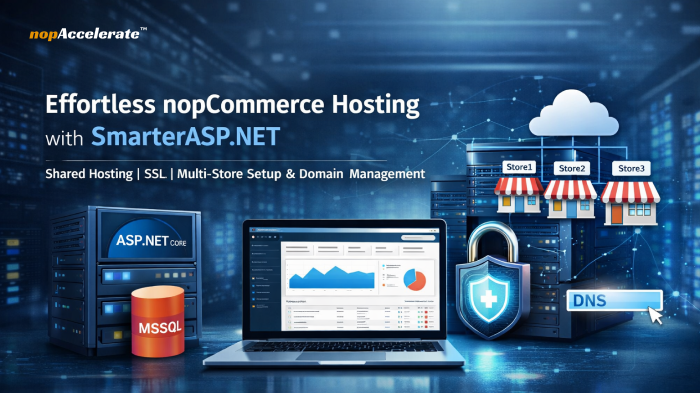
ASP.NET hosting setup for nopCommerce on SmarterASP.NET

Launching a nopCommerce store does not have to involve complex infrastructure, high hosting costs, or deep server administration. Whether you are a startup validating an idea, an agency building stores for clients, or a business moving online, the goal is the same: get your store online quickly, securely, and cost-effectively.

Many store owners assume running an ASP.NET eCommerce platform requires a VPS or cloud environment from day one. In reality, a properly configured shared Windows hosting environment can support most early-stage and mid-sized stores with far less overhead.

This is where SmarterASP.NET becomes a practical option. With support for ASP.NET Core, Microsoft SQL Server databases, free SSL certificates, and multi-domain hosting, it provides a simplified way to run nopCommerce without managing server infrastructure.

This guide explains how to set up nopCommerce on SmarterASP.NET, when this hosting approach makes sense, and what you gain after implementation.

The Hosting Challenges nopCommerce Users Commonly Face

nopCommerce is built on ASP.NET Core and Microsoft SQL Server. While powerful and flexible, hosting it traditionally involves several technical responsibilities.

You may need to configure a Windows server with IIS, install and bind SSL certificates, set up and secure a SQL Server database, and manage domain bindings for one or more storefronts. For experienced infrastructure teams, this is manageable. For startups and small teams, it can become a barrier that delays store launches and increases costs.

Another common issue is over-provisioning. Many businesses move directly to VPS or cloud hosting before their store generates steady traffic or revenue. This often results in higher monthly expenses and unnecessary system administration work.

When Shared Hosting Is Enough for nopCommerce

Shared ASP.NET hosting is not designed for very high-traffic enterprise systems, but it is often more than sufficient for many real-world eCommerce scenarios.

Shared hosting works well when a store is new or growing, traffic is moderate, and the application does not rely on heavy background processing or complex infrastructure integrations. In these cases, the main requirement is a stable Windows environment that supports ASP.NET Core and MSSQL, not full server-level control.

Shared hosting offers that foundation while removing the need to manage operating systems, IIS tuning, and ongoing security updates.

Why SmarterASP.NET Fits This Use Case

SmarterASP.NET is best viewed as a pre-configured environment for ASP.NET applications rather than just a generic hosting service. It reduces the amount of manual server setup typically required to run nopCommerce.

Typical Setup ProblemHow SmarterASP.NET Helps
Manual Windows server and IIS configurationReady-to-use ASP.NET hosting environment
SSL certificate installation complexityFree SSL provisioning from the control panel
Database provisioning challengesManaged Microsoft SQL Server databases
Hosting multiple storefrontsMulti-domain and multi-site support

The result is less time spent on infrastructure and more time focused on configuring products, payments, shipping, and customer experience.

Why Choose SmarterASP.NET for nopCommerce Hosting

nopCommerce needs a hosting environment that supports ASP.NET Core, Microsoft SQL Server, secure HTTPS connections, and flexible domain management. Rather than configuring these components manually, SmarterASP.NET provides them in a managed shared Windows hosting setup built for ASP.NET applications.

Key advantages include:

  • Support for modern ASP.NET Core 6/7/8 versions
  • Managed MSSQL and MySQL database hosting
  • Free SSL certificates for secure HTTPS access
  • Multi-domain and multi-store hosting capability
  • FTP access for reliable file uploads
  • Simple DNS management through the hosting control panel
  • No server maintenance at the infrastructure level

Who This Hosting Setup Is Best For

This approach is especially suitable for startups launching their first online store, agencies managing multiple client storefronts, businesses operating regional or multi-brand stores, and store owners migrating away from complex or expensive hosting environments. It is also useful for developers who want a straightforward way to deploy an ASP.NET Core eCommerce application.

As traffic and technical requirements grow, a move to a dedicated or cloud environment may make sense. For many businesses, shared hosting provides a practical and efficient starting point.

Step by Step: Setting Up nopCommerce on SmarterASP.NET

The following steps walk through the deployment process.

Step 1: Create a SmarterASP.NET Account

Visit SmarterASP.NET and choose the free trial option. Enter your email address and password, verify your email, and log in to the hosting control panel.

Step 2: Configure Hosting for a Single Website

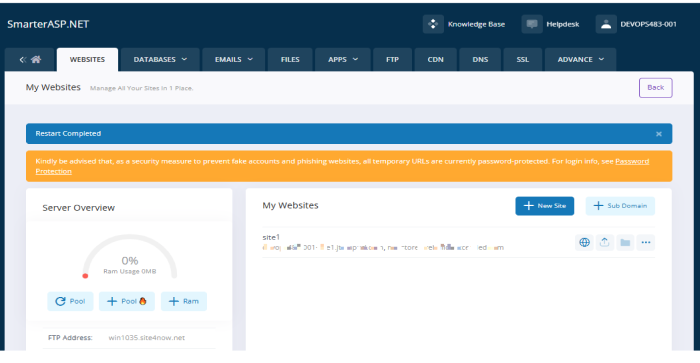
Open the hosting control panel and go to Websites, then Add Website. Enter a site name such as mystore.smarterasp.net and select the latest supported ASP.NET Core version available in the control panel. Save the configuration.

This prepares the hosting environment required to run an ASP.NET Core application such as nopCommerce.

SmarterASP.NET account dashboard showing website and server overview

Step 3: Request and Attach Free SSL

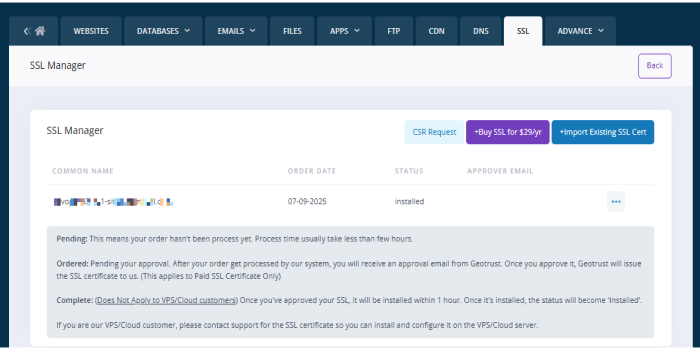
Go to the SSL Manager in the control panel, select your domain, and request a free SSL certificate. After activation, access your site using HTTPS.

SSL is essential for eCommerce because it encrypts customer data and is required by modern browsers.

SSL certificate management interface for nopCommerce hosting setup

Step 4: Set Up a Managed Database

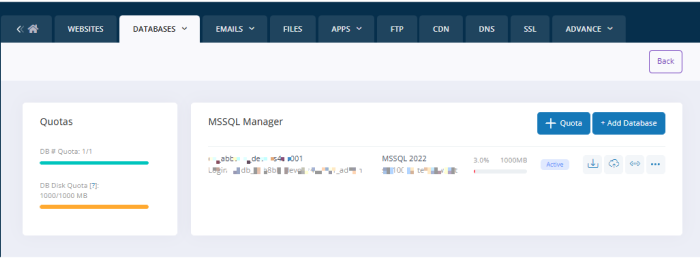
Navigate to the Database Manager and choose Microsoft SQL Server. Create a new database and define a database name, username, and password. Save these credentials for later use.

nopCommerce is optimized for MSSQL, which ensures compatibility and stable performance.

Creating managed MSSQL database for nopCommerce hosting

Step 5: Upload nopCommerce Source Code Using FileZilla

Because the built-in file manager may have size limitations, using FileZilla is more reliable for larger uploads.

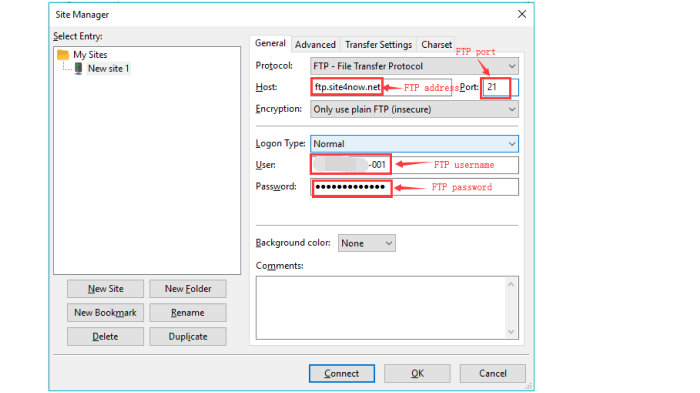
Install FileZilla, copy your FTP credentials from the hosting panel, connect to your hosting account, and upload the nopCommerce files into the /wwwroot/ directory.

Uploading nopCommerce source files using FileZilla FTP

Step 6: Configure nopCommerce Installation

Visit your site URL, for example https://mystore.smarterasp.net.

Provide the database type as MSSQL, enter the server name and database credentials from the previous step, and define your admin email and password. Click Install.

This process creates the database structure and links your store to the hosting environment.

Step 7: Access Storefront and Admin Panel

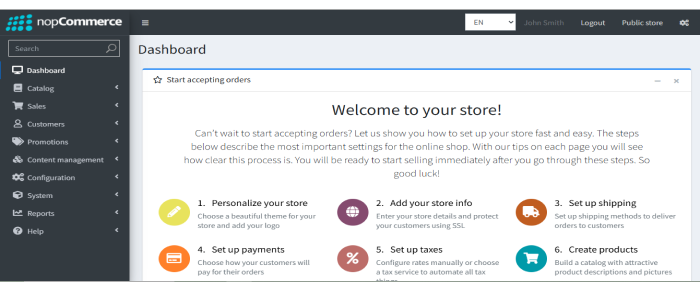
Your storefront will be available at your main domain, and the administration panel can be accessed at /admin. From the admin panel, you can manage products, themes, payments, shipping methods, email settings, and SEO options.

nopCommerce admin dashboard for managing online store

Step 8: Enabling Multi-Store Functionality in nopCommerce

Multi-store allows you to operate multiple storefronts for different brands, regions, or customer groups from a single nopCommerce installation.

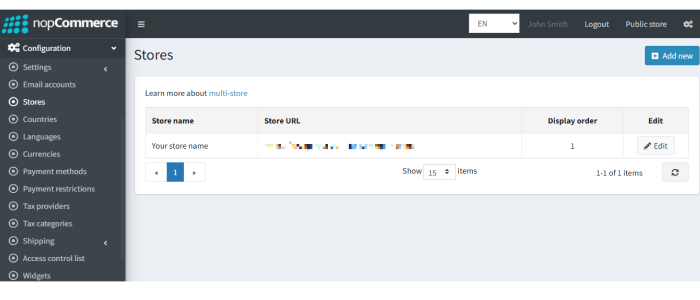
In the admin panel, go to Configuration and then Stores. Add a new store, enter the domain such as store2.example.com, and define its language, theme, and currency. Each store can have its own design and catalog while sharing the same backend.

Configuring website hosting settings for nopCommerce on SmarterASP.NET

Step 9: Domain Mapping Using CNAME or A Record

Domain mapping connects your branded domain name to your hosting account.

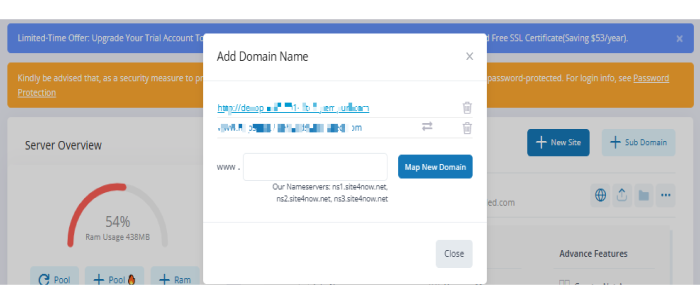
You can create a CNAME record pointing your subdomain to mystore.smarterasp.net or an A record pointing the domain to the hosting IP address. After DNS propagation, add the domain in the hosting control panel under Domains.

Adding custom domain name in hosting control panel

Step 10: Assign Domains and Enable SSL for Each Store

Within nopCommerce, open Configuration and Stores, edit the store, and assign the exact domain name. In SmarterASP.NET, open SSL Manager and request a free SSL certificate for that domain.

This ensures that each storefront runs securely over HTTPS.

Keeping nopCommerce Fast on Shared Hosting

To maintain stable performance on shared hosting, enable caching within nopCommerce, optimize product images before uploading, avoid unnecessary plugins, and monitor database size. Regular maintenance helps ensure consistent performance even as your catalog grows.

Bonus Operational Tips

  • Enable caching in nopCommerce to improve performance on shared hosting
  • Turn on bundling and minification for front-end assets
  • Use compressed and optimized images to reduce page load times
  • Take regular database backups to protect store data
  • Configure SMTP for order confirmations and customer notifications

Final Thoughts

For many growing businesses, the priority is to launch reliably without overengineering infrastructure. Shared ASP.NET hosting can provide a stable and cost-effective starting point before moving to more complex environments.

Start your nopCommerce store with a 60-day free trial using the link below

http://www.smarterasp.net/index?r=nopaccelerate

If this guide helped clarify the setup process, you can apply these steps to your own store or contact our experts for assistance in setting up your eCommerce store with simple DNS management, FTP access, free SSL, and zero server maintenance.

nopCommerce B2B eCommerce Upgrade Guide 2026 : How To Evaluate, Compare, And Decide

nopCommerce B2B upgrade strategy balancing cost and growth

Upgrading a nopCommerce store is not something every business should rush into and doing it at the wrong time can actually create more problems than it solves.

This guide is written for nopCommerce b2b store owners and decision-makers who are unsure whether upgrading is the right move right now, or whether their current setup can still support growth without adding friction.

This guide is for you if:

  • Your store is running, but results are not improving as expected
  • Everyday tasks feel harder or more time-consuming than they should
  • You’re unsure whether performance, SEO, or platform limitations are holding you back
  • You want clarity before making any technical or financial commitment

By the end of this guide, you should be able to answer one simple question with confidence:

Does upgrading my nopCommerce store make sense for my business right now or not?

How B2B Buying Expectations Have Changed in 2026

B2B eCommerce in 2026 no longer operates under “enterprise tolerance.” Buyers now expect the same level of speed, clarity, and self-service they experience in modern SaaS tools and leading digital platforms, even when purchasing complex or high-value orders.

Procurement teams and repeat buyers increasingly expect to:

  • Place repeat orders without contacting sales
  • Request quotes directly through the portal
  • View customer-specific pricing and availability instantly
  • Manage wishlists, reorders, and approvals independently

When these actions require emails, spreadsheets, or manual follow-ups, buyers rarely complain. Instead, decisions slow down, purchases are delayed, or activity shifts offline.

This change means that experience quality now directly affects deal velocity, sales efficiency, and account retention.

In many B2B organizations, the eCommerce platform quietly shapes how effectively the business sells.

Hidden Friction Inside Many B2B nopCommerce Stores

Most B2B nopCommerce stores do not fail outright. They continue operating, but with growing friction beneath the surface.

This friction typically appears in three areas.

Manual B2B Operations

In many B2B setups:

  • RFQs are handled through email or shared documents
  • Quotes are created and converted manually
  • Repeat orders depend heavily on sales teams

This increases sales workload, extends RFQ-to-order cycles, and reduces adoption of the digital portal.

Performance Issues at Scale

B2B stores often manage large catalogs, complex pricing, and frequent repeat purchases.

When performance is not optimized:

  • Category and search pages slow down
  • Mobile experiences suffer for field buyers
  • Finding and reordering products takes longer than it should

In B2B, slow experiences delay decisions and push buyers back to offline channels.

Plugin and Customization Dependency

Older B2B implementations often rely on multiple plugins and custom code to support core workflows.

Over time, this leads to:

  • Fear of updates or changes
  • Higher maintenance effort
  • Growing technical debt

At this stage, store owners often feel stuck, knowing improvements are needed, but unsure how to move forward safely.

This is usually the point where the question shifts from

“How do we fix this issue?”
to
“Is our current setup still right for where the business is going?”

How These Gaps Quietly Kill B2B ROI and Productivity

In B2B eCommerce, losses rarely appear as sudden drops. Instead, small inefficiencies compound over time.

  • Slower portals extend RFQ-to-order cycles
  • Manual workflows increase cost per order
  • Poor UX reduces self-service adoption

As friction increases, teams invest more effort just to maintain existing performance. Leadership attention shifts from growth initiatives to operational problem-solving.

This is often the moment when store owners realize they are spending more time and money to achieve the same or worse results.

Why Maintaining the B2B Store Is No Longer Enough

Routine maintenance keeps a store running, but it does not prepare it for modern B2B demands.

Maintenance helps:

  • Prevent immediate failures
  • Apply patches and fixes
  • Preserve the current way of working

However, it does not:

  • Reduce manual sales or admin effort
  • Enable automation or AI-driven workflows
  • Support scalable B2B buying experiences

As catalogs, customers, and pricing complexity grow, older architectures become a ceiling rather than a foundation. Changes feel riskier, performance tuning becomes harder, and innovation slows.

At this point, the platform resists progress instead of supporting it.

What a Modern B2B nopCommerce Store Must Deliver in 2026

Before discussing versions, it is important to define what “ready” means for B2B eCommerce today.

A modern B2B nopCommerce store must deliver:

High Performance at Scale

Fast category and search pages, stable performance with large catalogs, and smooth repeat ordering experiences.

Automation That Reduces Operational Load

Native workflows that reduce manual RFQ handling, simplify quote-to-order conversion, and streamline daily admin tasks.

SEO and Content Structure for Long Buying Cycles

Search-friendly category and product structures that support research-driven B2B buyers over extended decision journeys.

Native B2B Buying Workflows

Built-in support for RFQs, quotes, customer-specific pricing, wishlists, and repeat orders, without relying on fragile workarounds.

Security, Compliance, and Enterprise Trust

Strong security practices, accessibility compliance, and a stable foundation that enterprise buyers trust.

Where Older nopCommerce Versions Fall Short for B2B

Many older nopCommerce versions were designed when eCommerce played a supporting role in B2B sales.

Common limitations include:

  • Heavy dependence on plugins for B2B functionality
  • RFQ and quote processes managed outside the platform
  • Limited automation and AI readiness
  • Admin workflows that become inefficient as scale increases

Each year these limitations remain, technical debt grows and future upgrades become more complex.

Old nopCommerce vs nopCommerce 4.90: A B2B Decision View

By this point, most B2B nopCommerce store owners are not asking whether change is needed.
They are asking a more practical question:

What exactly improves if we move to nopCommerce 4.90 and how does that affect our B2B operations?

B2B Capability Comparison

B2B AreaOlder nopCommerce nopCommerce 4.90
Platform FoundationOlder .NET runtime, limited future readinessBuilt on .NET 9, enterprise-ready and future-proof
Performance & ScalabilitySlower category/search pages as catalogs growMajor performance optimizations for large catalogs
RFQ & Quote WorkflowsPlugin-based or email-driven RFQsNative RFQ → Quote → Order workflows
Pricing & Customer RulesBasic role-based pricingCustomer-specific, tiered, and negotiated pricing
Automation & AI ReadinessManual content, SEO, translationsAI-driven product content, SEO & translations
Buyer Self-ServiceLimited repeat orderingMultiple wishlists, faster reorders, account tools
Admin ProductivityTime-consuming daily operationsStreamlined admin UX & bulk actions
Security & ComplianceReactive updatesEnterprise security + accessibility compliance
Long-Term Maintenance RiskGrowing technical debtLower maintenance risk, upgrade-ready foundation

What This Means in Practice

Native RFQ workflows combined with AI-driven automation represent a major shift for B2B commerce. Instead of fragmented processes, buying becomes structured, faster, and easier to manage.

Performance improvements are especially impactful for B2B environments where scale is the norm. Faster experiences increase buyer confidence and portal adoption.

Most importantly, nopCommerce 4.90 reduces long-term risk by providing a cleaner, future-ready foundation.

What B2B Businesses Typically Gain After Upgrading

While every store is different, B2B organizations that modernize their nopCommerce platform commonly see:

  • Faster RFQ-to-order cycles
  • Reduced sales and admin workload
  • Higher adoption of self-service portals
  • Improved SEO visibility over time
  • Lower operational and maintenance risk

In practice, this means the eCommerce platform evolves from a support tool into a scalable sales engine.

Why B2B Store Owners Delay Upgrading (And When It’s Valid)

B2B nopCommerce upgrades are often delayed due to concerns around cost, complexity, and protecting existing workflows. This hesitation usually comes from avoiding disruption, not from ignoring growth.

However, delaying too long can limit productivity and future opportunities. At this stage, working with an experienced nopCommerce development team allows businesses to upgrade confidently, ensuring a smooth transition that protects data, preserves workflows, and avoids downtime.

A Smarter Way to Move Forward for Your B2B Store

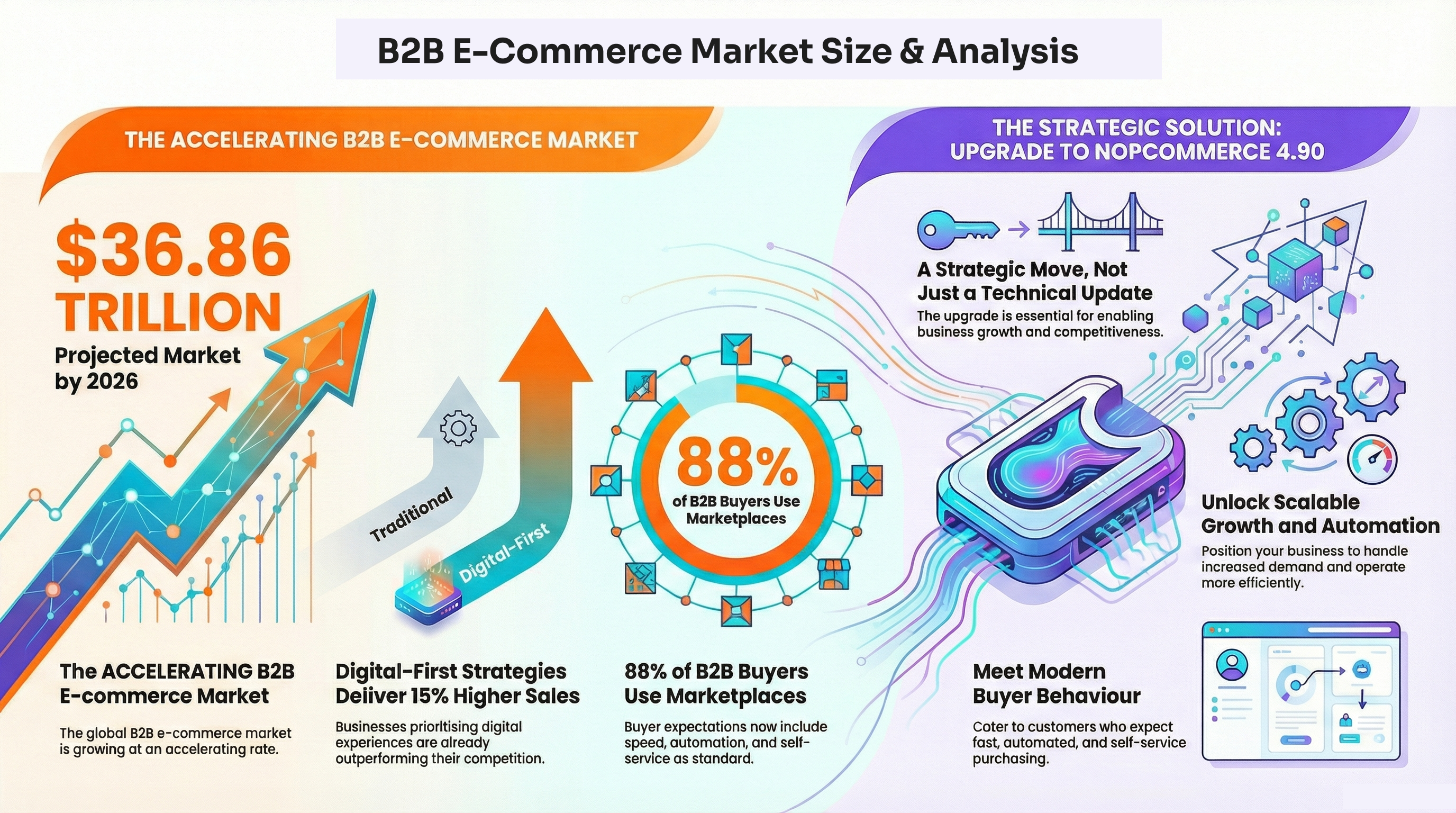
B2B eCommerce is accelerating rapidly, projected to reach $36.86 trillion in 2026, up from $32.11 trillion in 2025. Digital-first strategies already deliver 15% higher B2B sales performance, while automation is expected to save over $1.5 trillion globally. With 88% of B2B buyers using marketplaces annually, expectations around speed, automation, and self-service are now standard.

B2B eCommerce market size trends and buyer insights

For nopCommerce B2B store owners, upgrading to nopCommerce 4.90 is no longer just technical, it’s a strategic move to enable scalable growth, automation, and modern buying behavior.

Conclusion

In 2026, B2B growth depends on more than keeping your store running. If manual workflows, performance limits, or scalability issues slow progress, upgrading to a modern nopCommerce foundation becomes a strategic decision, one that improves efficiency, buyer experience, and long-term competitiveness.

What’s Next for Your nopCommerce Store?

Partner with nopAccelerate, your trusted nopCommerce experts, to upgrade smoothly to 4.90 without downtime, data loss, or disruption, at a competitive cost with reliable post-upgrade support.

Schedule Upgrade Consultation

Fill in form

and we will contact you

How can we help ?

Schedule a quick call, 15-minute meeting with one of our experts:

Thank You !

Our consultant will contact you in 24 hours.

Delivering generous mobile apps for Entrepreneurs, Startups & Businesses


Have a look at nopAccelerate Demo Store with 80,000+ products with nopAccelerate Solr and CDN Plugin.

download-trial Start Trial