nopAccelerate

Faster, scalable and reliable nopCommerce.

Blog

How nopCommerce AI Analytics Actually Works Inside Your Store Admin (And How to Evaluate It)
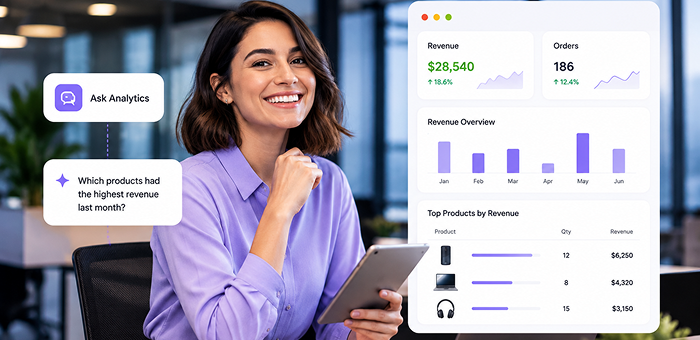
Your nopCommerce store already generates a large amount of useful data. The challenge is not always having the data but getting the right answer from it when you need to make a decision.

A standard report may show your sales, orders, customers, or products. But business questions are not always limited to predefined reports. You may want to know which products generated the most revenue last month, whether returns are increasing, or how new and returning customers are performing.
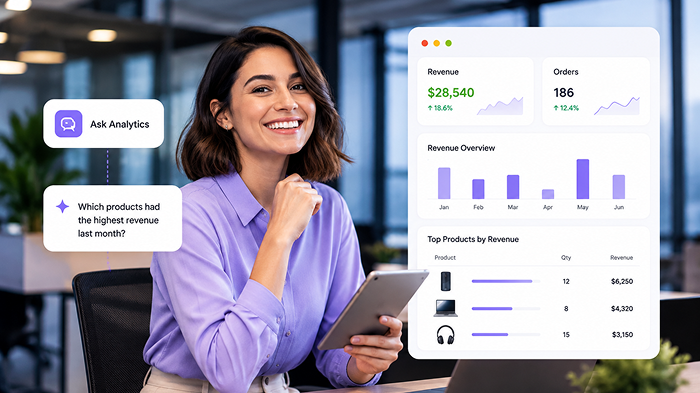
That is where a more flexible AI analytics approach can help.

nopCommerce AI Analytics brings dashboards, reports, live store data, Excel exports, and an AI Analytics Workspace into your nopCommerce admin. Instead of searching through different reports for every question, you can ask about your store data in plain English and get an answer.

But before choosing any analytics plugin, it is worth understanding how this approach actually works and what you should evaluate.

What Should You Expect From a nopCommerce Analytics Solution?

A useful analytics solution should do more than collect numbers. It should help you move from store data to useful information and then to a business decision.

When evaluating a solution for your nopCommerce store, consider whether it can help you:

  • See important store information in one place
  • Understand sales, customer, and operational trends
  • Investigate specific questions beyond fixed reports
  • Work with your live store data
  • Export information when you need to share it
  • Keep analytics within the admin workflow
  • Keep analytics separate from customer-facing storefront activity

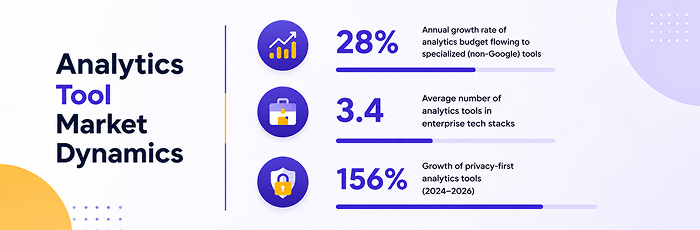
42% of enterprises use two or more analytics tools alongside GA4, showing how store teams often need more than one source to understand their data.

This is why a long feature list should not be the only thing you compare.

The more useful question is:

Can this solution help me find the information I need without making store analysis more complicated?

How Does AI Analytics Actually Work?

The main difference with AI analytics is how you interact with your store data.

Instead of starting by deciding which report to open, you can start with the question you want answered.

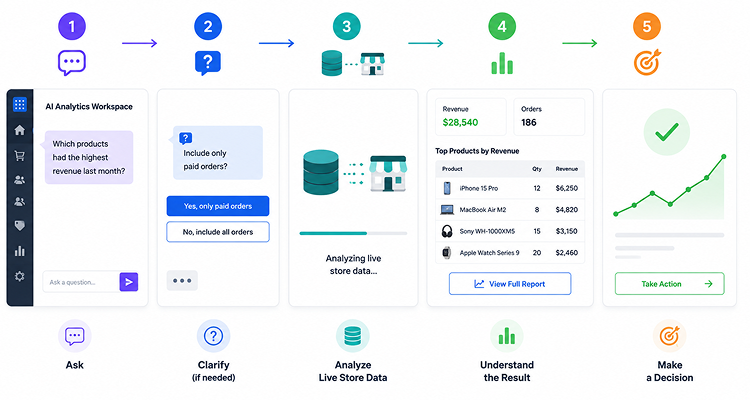
Step 1: Ask a question

For example:

“Which products had the highest revenue last month?”

You don’t need to know which report contains this information or write a database query yourself.

Step 2: AI clarifies the question when needed

Some questions can have more than one interpretation.

For example, revenue could depend on whether you want to include only paid orders or all orders. The AI Analytics Workspace can ask for clarification when additional details are needed.

That helps make the resulting analysis more relevant to the question you actually meant to ask.

Step 3: A safe, read-only query is generated

The workspace translates the analytics request into a query that can retrieve the required information.

The important part here is that the analytics workflow is read-only. It is designed to retrieve and analyze store information rather than change your store’s transactional data.

Step 4: The query works with your live store data

The plugin reads relevant information directly from your nopCommerce store data, including orders, customers, products, carts, discounts, returns, and addresses.

There is no need to build a separate duplicate logging pipeline just to use the analytics.

Step 5: The result is explained

Depending on the question, the workspace can provide a summary, key numbers, data tables, and optional charts so the information is easier to understand and use.

What Can You Ask Your nopCommerce Store Data?

Instead of being limited to a fixed set of report templates, you can ask questions based on what you are trying to understand at that moment.

For example:

“Which products had the highest revenue last month?”

“Are returns increasing?”

“What were my sales by country?”

“Which category generated the most revenue?”

“What is my average order value over the last 30 days?”

“Show new vs. returning customer orders.”

These questions can come from different parts of your day-to-day store management.

A store owner may want a quick health check. A merchandising manager may want to understand which products or categories are performing. An operations team may need to investigate returns or order activity.

The point is not simply that you can “chat with AI.”

The useful part is being able to start with the business question instead of first finding the right report.
Meet nopCommerce AI Analytics: Analytics Inside Your Store Admin

nopCommerce AI Analytics is an admin-only, read-only nopCommerce plugin designed to bring store analytics into one admin workflow.

It combines:

  • Analytics dashboards
  • KPI reporting
  • Trends and breakdowns
  • Product and category rankings
  • AI Analytics Workspace
  • Excel exports
  • AI configuration

The plugin has three main admin screens.

Analytics Dashboard

The dashboard gives you a fixed view of important store metrics, charts, trends, rankings, and exports.

It is useful when you want to open your admin and quickly understand what is happening across your store.

AI Analytics Workspace

This is where you ask questions about your store data in plain English. It is designed for questions that don’t necessarily fit into a fixed dashboard view.

AI Analytics Configuration

This area lets you enable the plugin and configure the AI provider, model, API key, endpoint, token limits, timeout, default date range, and prompt-log retention.

Together, these screens provide regular reporting and more flexible analytics within the nopCommerce admin.

What Can You See on the Analytics Dashboard?

The dashboard is designed to give you a broader view of store performance without moving between multiple reporting areas.

Sales

  • Total revenue
  • Total orders
  • Average order value
  • Average items per order

Customers

  • New registrations
  • Returning customer orders
  • Active customers
  • Retention

Operations

The dashboard also includes operational indicators such as pending orders and cart activity.

Trends and breakdowns

  • Orders and revenue trends
  • Order status
  • Payment methods
  • Shipping methods
  • New vs. returning customers
  • Customer registrations

Rankings

  • Top products
  • Top categories
  • Sales by region

Dashboard KPI summaries can also be exported to Excel for team reviews, leadership updates, or offline planning.

Why Does Live Store Data Matter?

Analytics is only useful when it reflects the information you actually need to understand.

nopCommerce AI Analytics reads relevant store information directly from your nopCommerce database, including:

  • Orders
  • Customers
  • Products
  • Carts
  • Discounts
  • Returns
  • Addresses

This means the analytics works with the data already being generated by your store rather than requiring a separate duplicate logging pipeline.

The data scope is focused on the nopCommerce store itself. External marketing or third-party data is not included.

Is nopCommerce AI Analytics Safe for Store Operations?

When analytics connects to live store data, one of the first questions is naturally about what it can change.

nopCommerce AI Analytics is built to give you store insights without changing how your storefront operates.

Admin-only

The analytics experience is intended for authorized nopCommerce admin users with the appropriate plugin permissions.

There is no storefront analytics widget for customers.

Read-only

The analytics workflow retrieves information for reporting and analysis. It does not write checkout data or modify store transactions.

Storefront-safe

Because the plugin is focused on admin-side analytics, it is designed not to interfere with customer-facing storefront behavior or order placement.

Privacy-aware

The workspace also includes controls around sensitive personal-data requests and prompt-log retention.

These details matter because analytics should give your team better visibility without becoming another system that needs to change how your store operates.

What About Store Performance?

Analytics should give your team useful insights without adding unnecessary overhead to your admin workflow.

Several performance-minded controls help keep analytics requests manageable, including:

  • Date-range limits
  • Caching
  • Projected queries
  • SQL timeouts

These controls help keep analytics requests manageable, particularly when working with larger amounts of store data.

Who Can Benefit From nopCommerce AI Analytics?

Store Owners

Use the dashboard for regular store health checks, review revenue and orders, monitor customer activity, and export summaries for business reviews.

eCommerce Managers

Explore sales, customers, products, categories, and trends when planning the next sales or marketing action.

Forbes reports that retailers using AI-enabled analytics for personalization and segmentation see 10–30% higher revenue and 15–22% lower customer acquisition costs.

Operations and Support Teams

Get answers to specific questions about orders, returns, sales regions, and other operational activity without writing SQL for every request.

Merchandising Teams

Review top products and categories, along with sales breakdowns, to understand what is actually selling.

nopCommerce Admins

Get both fixed reporting and conversational analytics within the nopCommerce admin rather than manually building every query.

How to Evaluate Whether It Fits Your Store

Before choosing a nopCommerce analytics plugin, ask:

  • Does it work with my live store data?
  • Can I see important metrics in one admin dashboard?
  • Can I investigate questions beyond fixed reports?
  • Can I ask questions in plain English?
  • Does it provide understandable results?
  • Can I export reports when needed?
  • Can I configure the AI provider?
  • Does the workflow fit how my team manages the store?

If the answer to these questions matches what you need, nopCommerce AI Analytics is worth evaluating.

Try It Before You Decide

nopCommerce AI Analytics includes a free trial, so you can see how the dashboard and AI Analytics Workspace fit into your own nopCommerce admin workflow before making a purchase decision.

You can explore your store information, review the reporting experience, and ask questions in plain English.

See your data. Ask your questions. Review the results. Decide if it fits.
eCommerce Analytics: Turning Store Data Into Better Decisions in 2026

Your store generates data every day.

Orders come in, customers register, products sell, discounts are applied, returns are processed, and sales move up or down. Over time, this creates a lot of information about how your store is performing.

The challenge isn’t always getting the data.

The real challenge is understanding what the data is telling you and what you should do next.

A revenue number can tell you how much you sold. A product report can show what sold the most. A customer report can show who is buying. Put these numbers together, and they can help you understand where your store stands, what needs attention, and where your next sales or marketing effort should focus.

That’s where useful eCommerce analytics starts.

Your Store Has More Data Than You Can Usefully Review

Most eCommerce stores have more information than an owner or admin can reasonably review every day.

You may have data around:

  • Orders and revenue
  • Average order value
  • Customers
  • Products and categories
  • Discounts and returns
  • Payment and shipping methods
  • Order status
  • Sales by region
  • New and returning customers

The information is useful. But seeing a number is only the first step.

Suppose your store generated $50,000 in revenue last month.

Is that good?

You need more context to answer that.

Did orders increase? Did average order value change? Which products contributed most? Did discounts play a major role? Are returning customers buying more? Did returns also increase?

The number tells you what happened. The questions around it help you understand what deserves attention.

Reporting Shows Where Your Store Stands

Good reporting gives you a practical view of store performance without making you search through every order or product record.

The exact metrics depend on your business, but a useful store review usually starts with a few key areas.

Sales and revenue

Revenue, order volume and average order value give you a basic picture of sales performance.

Looking at them together is more useful than looking at revenue alone.

If revenue increased while order volume stayed almost the same, customers may be spending more per order. If orders increased but average order value dropped, you may be gaining more transactions without increasing the value of each purchase.

The point is not to treat one number as an answer. Use the numbers together to find the next question.

Customer performance

Customer data can show whether your store is attracting new buyers and whether existing customers are returning.

Useful numbers can include:

  • New customers
  • Returning customers
  • Active customers
  • Repeat orders
  • Retention

A store with strong sales but weak returning-customer activity may need a different focus from one where repeat purchases are growing.

Product and category performance

Product data can help answer:

  • Which products generate the most revenue?
  • Which categories are performing well?
  • Which products sell frequently?
  • Which products need more attention?

This can influence what you feature, promote, bundle, stock or investigate next.

Operations

Sales are only one part of running an online store.

Pending orders, returns, payment methods and shipping methods can reveal operational issues that may affect customers or your team’s workload.

A useful reporting setup should help you see these signals alongside sales performance.

The Numbers Matter Only When You Know What to Look For

A report becomes more useful when you stop looking at numbers in isolation.

Imagine your revenue is up 15%.

That sounds positive.

But ask:

  • Did order volume also increase?
  • Did average order value increase?
  • Which products caused the growth?
  • Was it concentrated in one category?
  • Did discounts contribute?
  • Did returns increase at the same time?

Now consider the opposite.

Orders are up, but average order value is down.

That doesn’t automatically mean something is wrong. It gives you something worth investigating. Perhaps a promotion is bringing in smaller orders, a particular category is driving the increase, or customers are responding well to lower-priced products.

Gartner projected that by 2026, 65% of B2B sales organizations would move toward data-driven decision-making. Yet only 29% of organizations can evaluate data fast enough to stay ahead.

The important point is:

A number gives you a signal. Context helps you understand the signal.

Useful eCommerce analytics goes beyond collecting KPIs. It connects those numbers to questions and decisions.

Use Store Data to Answer Real Business Questions

Instead of starting every review with, “What reports do I have?”, start with:

“What do I need to know?”

That small change can make reporting much more useful.

“What is driving my sales?”

Look at revenue, orders, average order value, products and categories.

You may discover that a small number of products are responsible for a large share of sales. That could influence what you feature or promote next.

“Which products deserve more attention?”

Look at product revenue, quantity sold, category performance and changes over time.

A product that performs well may deserve more visibility. A product that consistently underperforms may need a closer look at pricing, positioning, availability or demand.

“Are customers coming back?”

Compare new and returning customers and review customer activity over time.

If returning customer activity is improving, understand what may be helping. If it is declining, that could be a reason to review retention or customer engagement.

“Are returns becoming a problem?”

Look at return activity over time and identify whether particular products or periods stand out.

A rising return trend doesn’t tell you the cause by itself, but it tells you where to investigate.

“Which part of the store needs attention?”

Sometimes the answer doesn’t come from one report.

You may need to compare sales, customers, products and operational data before you see the bigger picture.

That’s when reporting starts becoming a decision-making tool rather than just a record of what happened.

Turn Reports Into Your Next Sales and Marketing Decision

The real value of store data comes when you use it to plan what happens next.

If a category consistently generates strong sales, that could support a decision to give it more visibility, create related bundles or promote complementary products.

If a product gets attention but generates weak sales, you may want to investigate pricing, product information, availability or the customer journey before putting more marketing behind it.

Customer data can support another decision.

If returning customers are becoming a larger part of sales, that may influence how you approach retention, repeat purchases and customer communication.

Operational data matters too. If pending orders or returns are increasing, your next priority may not be another promotion. It may be fixing the operational issue first.

This is why reporting shouldn’t become a weekly exercise where someone exports numbers, puts them into a spreadsheet and moves on.

Ask:

“What changed, why might it have changed, and what should I investigate next?”

Why Fixed Reports Don’t Always Answer the Question You Have

Predefined reports are useful because they give you a quick way to review common information.

The problem starts when your question doesn’t fit neatly into one of those reports.

You may suddenly want to know:

Which products generated the most revenue last month?

Or:

Are returns increasing?

Or:

Which category contributed most to sales?

Or:

How are returning customers performing compared with new customers?

These are normal business questions. But answering them may require moving between screens, changing filters, exporting information or asking someone with technical knowledge to help.

That creates friction.

When getting an answer takes too much effort, useful questions often remain unanswered.

Where AI-Powered Store Analytics Fits

AI doesn’t need to replace your reports to be useful.

It can make it easier to explore your store data when you have a specific question.

Instead of remembering which report contains the information you need, you can ask the question directly.

For example:

“Which products had the highest revenue last month?”

A conversational analytics workflow can clarify important details when needed, run a safe read-only query against the relevant store data, and return a clear explanation with key numbers and, where useful, a chart.

The workflow changes from:

Find the right report → Apply filters → Review the results

to:

Ask the question → Get the relevant result → Understand it → Decide what to investigate next

The goal isn’t to make analytics more complicated with AI. It’s to make the information you already have easier to access and understand.

What a Useful nopCommerce Analytics Setup Should Give You

For a nopCommerce store, a useful analytics setup should make everyday store review easier.

It should help you:

  • See important sales and customer KPIs in one place
  • Understand trends instead of only seeing individual numbers
  • Review product and category performance
  • Check customer activity
  • Monitor orders and operational signals
  • Investigate specific store-data questions
  • Export useful summaries when needed
  • Keep analytics focused inside the admin experience

The benefit isn’t having the largest number of reports.

It’s being able to get the information you need without creating unnecessary work.

Using Analytics Without Adding Complexity to Your Store

Analytics should help your team run the store, not create another problem to manage.

For an admin-focused analytics solution, a few things matter.

Admin-only access

Store analytics can stay within the administration side of nopCommerce rather than adding unnecessary customer-facing functionality.

Read-only analytics

If the purpose is to understand store data, the analytics layer should not need to change checkout or order data simply to provide a report or answer a question.

Performance considerations

Reporting needs to remain practical as store data grows. Date-range controls, query limits, caching and timeouts can help keep analytics responsive.

A Simple Reporting Routine for Your Store

You don’t need to review every available metric every time.

A simple routine can start with five steps.

1. Start with the overall picture

Review revenue, orders and average order value.

Ask:

Are sales moving in the direction I expect?

2. Check customer health

Look at new and returning customers and available retention indicators.

Ask:

Are we building repeat business or relying mainly on new customers?

3. Check products

Review top products and categories.

Ask:

What is selling, and what deserves more attention?

4. Check operational signals

Review pending orders, returns and other relevant operational data.

Ask:

Is anything happening that could affect customers or the team’s workload?

5. Ask one more question

Once you’ve reviewed the basics, ask:

“What changed, and what should I investigate next?”

That’s often where reporting becomes more valuable.

Final Takeaway

Your store already generates a large amount of useful data.

The advantage doesn’t come from collecting more numbers. It comes from making important information easy to review, putting it into context and using it to guide the next decision.

Reports show what happened.

Good analysis helps you understand what deserves attention.

And when you can ask specific questions about your store data without hunting through reports, you can move from simply checking performance to acting on it.

For nopCommerce store admins, an admin-only, read-only analytics solution with dashboards, reports, exports, and plain-English data questions provides a clearer view of store performance. Quickly find the information you need to make better sales, marketing, and operational decisions.

nopCommerce Elasticsearch vs nopAccelerate Plus Pro Search: How to Evaluate and Decide

If you run a nopCommerce store, you know the truth: your search box is a silent salesperson. When it works, customers find products and check out. When it fails, they leave, often heading straight to a competitor.

So, when you start looking for a serious search plugin, two names dominate the nopCommerce conversation: the official nopCommerce Elasticsearch plugin (developed by the nopCommerce team) and nopAccelerate Plus Pro Search (built by nopAccelerate on top of Apache Solr). Both promise faster, smarter search.

But they are not equal.

This is an honest, feature-by-feature, store-owner-focused comparison of what each plugin does, what it takes to run, and which one is more likely to move your revenue needle.

Why Your nopCommerce Store Needs More Than the Default Search

The search that ships with nopCommerce is perfectly acceptable for a small catalog with basic needs. But once your store grows past a few hundred products, the cracks start showing:

  • Slow query response times as the product table grows
  • Weak typo tolerance: a customer typing “iphon” often gets zero results
  • Poor relevance ranking: the right product isn’t in the top 5
  • Limited faceted filtering: customers can’t drill down by brand, size, color, and price at once without page reloads
  • Admin-side slowdown: searching products in the backend becomes painful past ~10,000 SKUs

Each is a conversion killer. Industry research from Baymard Institute and Nielsen Norman Group indicates that visitors who use on-site search convert at significantly higher rates, but only when the search works well. A broken search box converts worse than no search at all, because it teaches customers your store doesn’t have what they want.

That gap, between “search exists” and “search sells,” is what both plugins were built to close. The question is which one closes it more effectively.

Overview of Two Popular nopCommerce Search Plugins

nopCommerce Elasticsearch

The plugin, developed by the nopCommerce team, integrates your store with Elasticsearch 8.x, using the v8 .NET client.

Its capabilities include:

  • Bulk product indexing
  • Real-time or scheduled index updates
  • Automatic language matching per store language
  • Fuzzy search (typo tolerance)
  • Wildcard search
  • A strongly-typed API and query DSL for developers

It’s newer, backed by the nopCommerce team, and designed for compatibility with future nopCommerce releases.

nopAccelerate Plus Pro Search

Built by nopAccelerate, a nopCommerce solution partner based in India, nopAccelerate Plus Pro integrates your store with Apache Solr, the open-source enterprise search platform powering many of the world’s largest commerce sites.

Its core capabilities include:

  • Real full-text search with advanced language analysis across 36 languages
  • Multi-facet drill-down filters with Ajax (no page reloads)
  • Custom relevance weighting per field, controllable from the admin
  • Solr Native DIH (Data Import Handler) indexing
  • Multi-store, multi-currency, and multi-language handled inside a single Solr core
  • Enhanced admin panel product search
  • Spell check, “Did you mean?”, autocomplete, infinite scrolling, and state-aware URLs
  • Enhanced catalog navigation on category, tag, and manufacturer pages

The plugin has been in production since ~2014, refined across multiple nopCommerce major versions, and is now in its Plus Pro iteration.

Head-to-Head: The Search Feature Comparison That Actually Matters

The table below highlights the key differences between the two plugins.

CapabilitynopCommerce ElasticsearchnopAccelerate Plus Pro
Underlying search engineElasticsearch 8.xApache Solr
Vendor focusnopCommerce platform teamSpecialized in nopCommerce performance
Years in productionNew (launched 2024–2025)10+ years, multiple major iterations
Language supportAuto-matched to store language36 languages with advanced analyzers
Fuzzy / typo toleranceYesYes
Wildcard searchYesYes
Diacritics handlingStandard Elasticsearch behaviorExplicitly supported
Spell check & “Did you mean?”BasicBuilt-in, tuned for eCommerce
Autocomplete / query suggestionsBasicYes
Multi-facet drill-down filtersNot a core focusCore feature
Ajax faceted filteringNot a core focusYes
Custom field weighting for relevanceManual via DSLBuilt into admin UI
Multi-store, multi-currency, multi-languageStore supportSingle Solr core handles all
Admin panel search speedupNot highlightedYes
Category / tag / manufacturer page enhancementPrimarily focused on search integrationFull catalog navigation enhancement
Infinite scrolling on search resultsNot built-inYes
State-aware URLs (bookmarkable filters)Not built-inYes
Default AND / OR operator controlVia query DSLAdmin-configurable
Real-world scale referenceLimited public data so farDemo store with 80,000+ products; customer deployments referenced at 100,000+ products
License modelPaid via nopCommerce marketplacePaid; Enterprise license includes source code
The pattern is unmistakable: the official plugin is a strong general-purpose search integration. nopAccelerate Plus Pro is a purpose-built eCommerce search-and-navigation suite.

What Your Customer Actually Sees: Search Quality in Action

Imagine you sell electronics. A customer visits your store and types “wirless headphon under 500”.

With nopCommerce Elasticsearch plugin:

  • Fuzzy search catches “wirless” and “headphon” and returns headphone results correctly.
  • The customer sees a list of headphones on the search page.
  • To filter by price under $500, they use the standard nopCommerce category-page filters, which typically reload the page each time.
  • To narrow by brand or connection type, they scroll and click, wait, click, wait.
  • Search works. Navigation feels ordinary.

With nopAccelerate Plus Pro plugin:

  • Fuzzy search plus spell correction catches “wirless headphon” instantly and shows a “Did you mean: wireless headphones?” suggestion.
  • Autocomplete would have surfaced these products while they were still typing.
  • The results page displays multi-select facets on the left: brand, price range, connection type, color, and rating, all updating live via Ajax, with no page reloads.
  • The customer ticks “Wireless,” drags a price slider under $500, and watches results narrow in real time.
  • Infinite scroll loads more results as they scroll, with no clicking to page 2, 3, 4.
  • If they bookmark the filtered view, the URL preserves their filter state, so they can come back tomorrow to the same set of products.

Both plugins found the product. Only one made buying it easy.

That “easy” difference is exactly where conversion rates move. It’s why the enterprise commerce leaders (Amazon, eBay, Walmart, Best Buy) invest heavily in faceted discovery. nopAccelerate Plus Pro brings that same discovery pattern to your nopCommerce store, out of the box.

nopCommerce Search Performance & Scale at 100,000+ Products

Marketing pages love “blazing fast.” Here’s what we can honestly say.

Both Elasticsearch and Apache Solr are built on the same underlying library, Lucene. At the engine level, their speed is broadly comparable for typical eCommerce workloads.

Where they differ inside a nopCommerce store is at the plugin layer: how efficiently each integration handles indexing, updates, and catalog changes at scale.

The evidence today:

  • nopAccelerate Plus Pro runs a public demo store with 80,000+ products, and customer deployments referenced on the nopCommerce marketplace handle 100,000+ products with category pages containing 30,000+ items.
  • The official nopCommerce Elasticsearch plugin is newer to market and does not yet have public production references at that scale.

If your catalog is already large, or heading there in the next 8 to 12 months, nopAccelerate Plus Pro carries the longer proven track record.

Why nopAccelerate Plus Pro Wins on eCommerce Feature Depth

The official Elasticsearch plugin is a strong search integration. nopAccelerate Plus Pro goes further as a full discovery and merchandising system, improving what your customers experience and what your team spends time on.

Wins for Your Customers

Faceted navigation across the whole catalog. With nopAccelerate Plus Pro, category pages (say, “Men’s Running Shoes”) use the same Solr-powered filtering as the search results: fast, Ajax-driven, multi-select filters that update without page reloads. The official plugin leaves category pages on default nopCommerce navigation.

Deep-linkable filtered URLs. State-aware URLs capture the customer’s filter combination in the URL itself. Filtered URLs can be shared and bookmarked (SEO indexing depends on the store’s SEO strategy). Marketing teams can run ads directly to specific filtered results. Standard in nopAccelerate Plus Pro; not built into the official plugin.

Wins for Your Team

Merchant-controlled relevance tuning. nopAccelerate Plus Pro lets you tune relevance weighting per field directly from the admin. Want product name to matter 3× more than description? Configure it yourself. The official plugin tunes through the Elasticsearch DSL: powerful but developer-only, so every change becomes a code deployment.

Multi-store, multi-currency, multi-language in one index. If you run multiple nopCommerce stores from a single installation, nopAccelerate Plus Pro handles all of them in a single Solr core. Less infrastructure, easier maintenance. The official plugin supports stores but needs more careful orchestration for complex multi-language, multi-currency setups.

Faster admin panel product search. A quiet productivity gain that compounds if your team searches and edits products every day.

This is why, for most merchants, nopAccelerate Plus Pro is materially more complete for an eCommerce use case.

When the Official Elasticsearch Plugin Still Fits

Choose the nopCommerce Elasticsearch plugin if:

  • Your organization already runs Elasticsearch for logs, analytics, or other applications, and you want to consolidate infrastructure onto one stack.
  • You plan to layer Kibana dashboards, Elastic ML, or vector/AI search on top of the same cluster in the future.
  • You have strong in-house .NET and Elasticsearch DSL expertise and prefer to build custom relevance tuning yourself.
  • Your search needs are narrow: mainly the search box, not deep catalog navigation or discovery.
  • Vendor consolidation is a policy requirement: you want everything from the nopCommerce team, with no third parties in the stack.

These are legitimate reasons, but they are mostly infrastructure and organizational, not customer-experience. For the majority of nopCommerce merchants, nopAccelerate Plus Pro’s feature depth wins on merit.

The Store Owner’s Decision Framework

Cut through the noise with these six questions:

1. How large is your catalog today, and where will it be in 12 months?

Under ~5,000 products: either plugin works. Above 10,000: nopAccelerate Plus Pro’s track record is your safer bet.

2. How important is faceted, drill-down navigation to your customers?

If browsing by multiple attributes matters (fashion, electronics, home goods, industrial parts, auto parts): nopAccelerate Plus Pro is built for exactly this workflow.

3. Do you run multiple stores, currencies, or languages on one nopCommerce install?

If yes: nopAccelerate Plus Pro’s single-core architecture handles it more elegantly.

4. Does your organization already run and manage Elasticsearch elsewhere?

If yes: the official plugin lets you reuse infrastructure and expertise.

5. Are you optimizing for developer control or merchant control?

Developer-first (DSL, custom builds): official Elasticsearch. Merchant-first (admin UI configuration): nopAccelerate Plus Pro.

6. Do you value direct, reliable, and fast support rather than community-driven support?

If yes, the nopAccelerate Plus Pro has an advantage with its 5-star support system, where you can talk directly to the developers who build and maintain it, supporting many high-traffic customer stores.

Total Cost of Ownership for Search Plugins

Cost isn’t just the license price. Weigh these five buckets:

  • License fee: Both are paid products. Get current quotes directly from both vendors, since pricing can shift with nopCommerce versions and license tiers.
  • Infrastructure: Elasticsearch clusters and Solr instances both need JVM memory. Solr tends to be lighter for pure search workloads; Elasticsearch pulls ahead if you also plan analytics or ML on the same cluster.
  • Setup effort: nopAccelerate Plus Pro is turnkey with installation guides, an admin UI, and dedicated vendor support. The official Elasticsearch plugin is straightforward for a .NET developer but assumes you’ve already stood up Elasticsearch separately.
  • Ongoing tuning: nopAccelerate Plus Pro’s admin-configurable weighting reduces developer dependency for every relevance change. The official plugin’s DSL tuning is more powerful in raw terms but developer-only.
  • Support responsiveness: nopAccelerate has a decade of customer testimonials referencing responsive, hands-on support specifically for their plugin. The official plugin gets nopCommerce team support, which covers the full platform (not exclusively search).

Over a three-year window, the plugin that reduces your developer dependency usually wins on TCO, not the one with the lower sticker price.

Final Verdict

For most nopCommerce merchants, nopAccelerate Plus Pro Search is the stronger choice. It’s eCommerce-native, feature-rich, and proven at scale. The official nopCommerce Elasticsearch plugin is a solid choice if you already use Elasticsearch or plan to build on the Elastic ecosystem.

Ultimately, search is about making it easier for customers to find, filter, and buy. For most stores, nopAccelerate Plus Pro offers greater value.

Ready to See It for Your Own Store?

The best way to decide is to see the plugin in action. Explore the nopAccelerate Plus Pro demo store to experience its search and faceted navigation firsthand, then compare it with your own search requirements.

Your search box is a silent salesperson. Choose the one that closes more deals.

Why Customer Service Automation Is One of the Most Valuable AI Use Cases in eCommerce

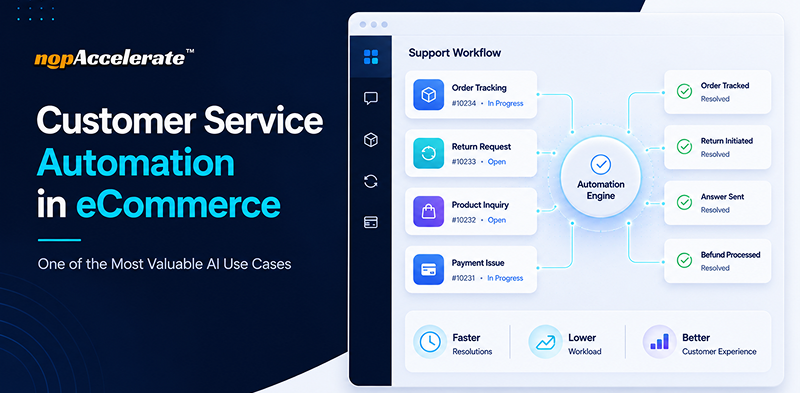
Customer service automation workflow for eCommerce support operations

In our previous blog, we explored several AI use cases shaping modern eCommerce. Here, we’ll focus on one of the most valuable and widely adopted applications: customer service automation.

Most eCommerce stores start automation the wrong way. They implement a tool expecting it to solve every support challenge, only to find customers still frustrated and support tickets still growing months later.

The problem is not automation itself. Most stores simply automate the wrong things first or choose the wrong approach.

This blog explains what customer service automation actually means in eCommerce, what support tasks are worth automating, where stores go wrong, and how to implement it effectively.

What Customer Service Automation Actually Means in eCommerce

Customer service automation is not about replacing your support team. It is about removing repetitive, low-complexity tasks so agents can focus on conversations that require human judgment and problem-solving.

In eCommerce, that repetitive workload is significant. Questions like “Where is my order?”, “What is your return policy?”, “Do you ship to my state?”, and “How long does delivery take?” make up a large share of support requests.

These questions do not require experience or empathy. They require accurate information delivered instantly, which is exactly what automation is built for.

According to Salesforce, AI already resolves about 30% of customer service cases as of 2026, and that number is expected to hit 50% by 2027. That is not a future trend. It is already happening in stores that have identified the right support processes to automate.

Why Customer Service Became One of the First AI Investments in eCommerce

AI is transforming every area of eCommerce, from personalization and product discovery to inventory management and pricing. Yet customer service remains one of the first places businesses invest in AI.

The reason is simple. Customer support directly affects both customer experience and operational efficiency. Every unanswered question impacts the customer, while every support ticket adds pressure to the business.

Unlike many AI initiatives that take time to show results, customer service automation often delivers value quickly. It helps businesses reduce response times, handle repetitive inquiries at scale, and free support teams to focus on more complex conversations.

For many eCommerce companies, it is often the first step in their AI journey.

The Three Layers of Customer Service Automation in eCommerce

Before automating customer support, it helps to understand how support requests typically break down. Most eCommerce interactions fall into three distinct layers.

Layer One: Routine Information Queries

These are questions with clear, factual answers, such as shipping timelines, return policies, payment methods, order status, product availability, and size guides.

These queries can be answered instantly and accurately through automation, allowing support teams to focus on more valuable work.

Layer Two: Product Discovery and Guidance

This layer is more complex. A shopper searching for “waterproof boots for construction work under $80” needs a relevant product recommendation, not a link to a category page.

To handle these requests, the automation system must understand intent and search product data in real time. Basic automation tools often struggle here, while AI-powered solutions connected to your product catalog can provide meaningful answers.

Layer Three: Complex and Emotional Conversations

Some situations still require human involvement. A damaged order, a custom B2B request, or a frustrated customer after a delivery issue often needs empathy, judgment, and problem-solving.

The goal of automation is not to replace these conversations. It is to remove routine requests so support teams can focus on the interactions that matter most.

Why Customer Service Automation Is One of the Most Valuable AI Use Cases in eCommerce

For most eCommerce businesses, customer service automation solves a challenge that already exists: growing support volume.

Unlike AI initiatives that focus on a single function, customer service automation impacts multiple business goals at once:

  • Faster customer response times
  • Lower operational costs
  • Improved support efficiency
  • Better customer experiences
  • Greater scalability as the business grows

That is why customer service automation is often one of the first AI investments businesses make and one of the easiest to measure.

Where Most eCommerce Stores Go Wrong With Automation

Stores that struggle with customer service automation usually make one of three common mistakes.

Mistake One: Choosing a Rule-Based Bot and Calling It Automation

There is a significant difference between a rule-based chatbot and an AI-powered support tool.

Rule-based bots rely on keywords and scripted responses. If a customer phrases a question differently, the bot often fails to understand the request, creating a frustrating experience.

AI-powered tools work differently. They understand intent, allowing them to recognize that “Can I get my money back if I do not like it?” and “What is your refund policy?” are asking the same thing.

Chatbot industry research shows that 88% of people used a chatbot in the past year, and over 80% had a positive experience. However, many businesses still rely on rule-based systems that often fall short of customer expectations.

Mistake Two: Automating Without Connecting to Store Data

A chatbot that cannot access store data is little more than a FAQ page with a chat window.

For automation to work in eCommerce, it must connect to product catalogs, inventory systems, order management platforms, and store policies. Without those connections, responses remain generic and often unhelpful.

Whether a customer is asking about a product, an order, or current inventory, access to real store data is what makes automation useful.

Mistake Three: Setting It Up Once and Walking Away

Customer service automation is designed to reduce manual work, not create more of it.

However, stores still need to review and update their automation periodically as products, policies, and customer questions change. In most cases, a monthly or quarterly review is enough to keep responses accurate and relevant.

If automation is never updated, response quality can gradually fall behind the business it is meant to support.

What Customer Service Automation Gets Right When Done Properly

When customer service automation is implemented with the right tools and integrations, the results are measurable.

According to Gartner, the average cost of a human agent interaction is $6.00, compared to $0.50 for an AI chatbot interaction. Studies also show that businesses using AI for customer service reduce support costs by an average of 30%.

For most eCommerce businesses, however, the bigger advantage is response time.

88% of customers expect faster responses than they did a year ago. Automation helps businesses meet those expectations by resolving routine inquiries instantly, regardless of support hours.

For example, a shopper visiting your store late at night may have a question about returns before completing a purchase. Instead of waiting until the next business day, they receive an immediate answer and can continue their buying journey.

The Types of Queries That Are Ready to Automate Right Now

The most successful automation projects start with the right types of customer inquiries.

Policy and Store Information

Return policies, refund timelines, shipping costs, delivery windows, payment methods, business hours, and contact details are ideal candidates for automation because the answers are consistent and rarely change.

Product and Catalog Questions

A shopper searching for “women’s running shoes in size 8” needs a relevant answer, not a category page.

Connected to product data, AI can handle product searches, specification questions, compatibility checks, and recommendations in real time. This improves product discovery while reducing support workload.

Order Status for Logged-In Customers

Order tracking is one of the most common support requests and one of the easiest to automate.

Customers should be able to ask “Where is my order?” and receive a real-time answer pulled directly from their account without requiring agent involvement.

Frequently Asked Questions

Sizing guides, care instructions, product compatibility, and other fact-based questions are ideal candidates for automation, freeing support teams to focus on more complex inquiries.

How to Figure Out What to Automate First in Your Store

Start by reviewing the last 30 days of support tickets or customer emails.

Most eCommerce businesses find that a small number of recurring questions generate the majority of support volume. In many cases, five or six topics account for 60% to 70% of all inquiries. Those are your best automation opportunities.

If the most common questions involve shipping, returns, policies, or order status, they can often be automated immediately. If product discovery questions are common, choose a solution that can access your catalog and understand natural language.

Once automation is live, review conversations periodically to identify gaps and improve responses. Businesses that achieve long-term success make small adjustments over time as customer questions, products, and policies evolve.

Conclusion

Automation is not a shortcut. It is a smarter way to run support. When you automate the right queries with the right tool, your team works better, your customers wait less, and your store runs smoother around the clock.

Next up, how AI chatbots specifically handle eCommerce customer support, what they can actually do inside your store, and what to look for before you choose one.

AI in eCommerce: Practical Use Cases and Solutions for B2B and B2C Commerce

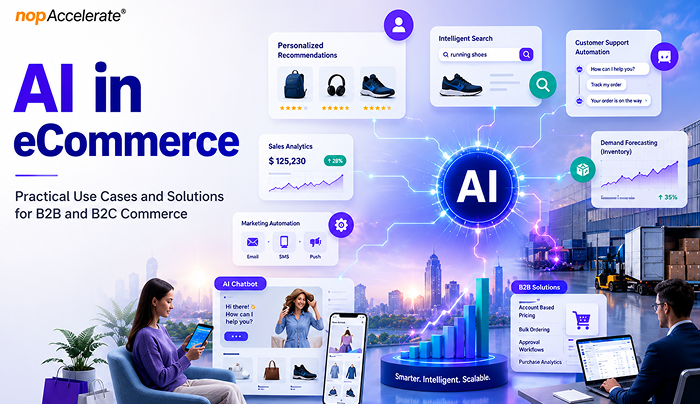
AI powering search, pricing, inventory, and customer experiences

Artificial intelligence has quickly moved from a competitive advantage to a business necessity in eCommerce.

Retailers face rising customer acquisition costs, growing customer expectations, and increasing operational complexity. Meanwhile, shoppers expect fast product discovery, personalized experiences, accurate inventory visibility, seamless support, and frictionless checkout across every channel. Businesses that fail to meet these expectations risk losing customers to competitors that can.

This is where AI is creating measurable value. From product recommendations and search optimization to demand forecasting and fraud prevention, AI helps businesses improve customer experiences while increasing operational efficiency.

According to McKinsey, AI-powered personalization can help leading organizations generate up to 40% more revenue from those activities than slower-moving competitors. Yet many businesses struggle because they focus on AI tools before identifying clear objectives and high-impact use cases.

This guide explores where AI delivers the greatest value across the eCommerce journey and how businesses can adopt it strategically.

What AI in eCommerce Actually Means

When people hear AI, they often think of chatbots or content creation tools. In reality, AI supports many more eCommerce activities.

At its core, AI helps businesses analyze large amounts of data, spot patterns, make predictions, and automate tasks that would otherwise take significant time and effort.

Several technologies make this possible:

  • Machine learning for forecasting, recommendations, and fraud detection
  • Natural language processing (NLP) for search and customer support
  • Computer vision for image recognition and visual search
  • Generative AI for content creation and communication
  • AI agents that can perform tasks with minimal human input

AI adoption continues to grow because businesses now collect more customer, product, and business data than ever before. AI helps turn that data into actions that improve efficiency, customer experience, and revenue.

Rather than replacing people, AI helps teams save time, reduce manual work, uncover useful insights, and make better decisions.

Where AI Creates Value Across the eCommerce Business

Personalization and Customer Experience

Personalization is one of the most valuable uses of AI in eCommerce industry.

Customers no longer respond well to generic shopping experiences. They expect brands to understand their preferences, buying behavior, and interests. AI makes this possible by analyzing browsing activity, purchase history, and customer behavior.

For example, a customer who regularly buys fitness products may see different recommendations and promotions than someone shopping for home décor. The goal is to help customers find relevant products faster.

Common personalization use cases include:

  • Product recommendations
  • Customer segmentation
  • Dynamic promotions
  • Personalized email campaigns
  • Loyalty program optimization
  • Customer lifetime value prediction
  • Churn detection
  • Localized shopping experiences
  • Dynamic website content

Personalization does more than improve conversion rates. It can increase average order value, improve customer retention, and strengthen customer relationships.

Search and Product Discovery

Product discovery has become one of the most important areas in eCommerce.

Customers often know what problem they want to solve but struggle to describe it using product-specific terms. Traditional keyword search can fail because it matches words rather than understanding intent.

For example, a customer searching for “comfortable shoes for standing all day” is looking for a solution, not a category page.

AI-powered search helps bridge that gap by understanding context, customer behavior, and search intent.

Applications include:

  • Semantic search
  • Visual search
  • Voice search
  • Product comparison assistance
  • Guided selling experiences
  • Search result optimization
  • Automated product tagging
  • Personalized search experiences

Poor search experiences often lead to higher bounce rates and abandoned shopping sessions. Better search helps customers find the right products faster, reducing friction throughout the buying journey.

Customer Service and Support Automation

Customer support is often one of the first areas where retailers invest in AI because it improves both customer experience and operational efficiency.

Support teams spend a large amount of time answering repetitive questions about orders, deliveries, returns, refunds, product availability, and account information. While important, many of these interactions follow predictable patterns.

AI can automate routine support tasks, allowing human agents to focus on situations that require empathy, judgment, or complex problem-solving.

Common applications include:

  • Order tracking and delivery updates
  • Returns and refund assistance
  • Customer self-service portals
  • Product discovery and recommendations
  • Knowledge-based customer assistance
  • Post-purchase order support
  • Smart follow-up conversations

The benefits go beyond cost savings. Faster responses improve customer satisfaction and reduce frustration throughout the customer journey.

Many retailers are also adopting customer service automation to deliver faster and more consistent support experiences. Customers can quickly access answers to common product, order, and policy questions without waiting for assistance.

This helps businesses create more responsive support operations while reducing pressure on internal teams.

Inventory, Supply Chain, and Operations

Inventory management remains one of the biggest challenges in eCommerce.

Stock too much inventory and cash gets tied up in unsold products. Stock too little and businesses risk lost sales, unhappy customers, and damaged trust. AI helps reduce this uncertainty.

By analyzing sales patterns, seasonal trends, inventory levels, supplier performance, and market signals, AI can improve forecasting accuracy and support better planning.

Common operational applications include:

  • Demand forecasting
  • Inventory optimization
  • Automated replenishment
  • Warehouse allocation
  • Returns forecasting
  • Supply chain visibility
  • Order orchestration
  • Fulfillment optimization

Research from McKinsey has found that organizations using AI in supply chain operations have reported improvements in logistics efficiency, inventory management, and service performance.

For retailers, these improvements can lead to lower operating costs, fewer stockouts, and better customer experiences.

Pricing, Revenue Optimization, and Fraud Prevention

Pricing decisions have always required balancing profitability and competitiveness.

The challenge is that market conditions constantly change. Competitor pricing, inventory levels, customer demand, and promotions can all influence pricing decisions. AI helps businesses respond faster.

Instead of relying entirely on manual analysis, pricing engines can continuously evaluate market conditions and recommend pricing changes based on business goals.

Common revenue optimization applications include:

  • Dynamic pricing
  • Promotional optimization
  • Competitor price monitoring
  • Markdown management
  • Revenue forecasting
  • Margin optimization

AI is also becoming increasingly important for fraud prevention.

As online transactions grow, so do fraud risks. Traditional rule-based systems often struggle to keep up with more sophisticated threats.

AI helps identify suspicious activity by analyzing transaction patterns, customer behavior, device activity, and account history in real time.

Key security applications include:

  • Fraud detection
  • Payment risk analysis
  • Account takeover prevention
  • Return fraud monitoring
  • Transaction monitoring

The result is stronger security without adding unnecessary friction for legitimate customers.

Content, Marketing, and the Rise of Agentic Commerce

Content has become a major challenge for growing eCommerce businesses.

Every new product requires descriptions, metadata, category content, promotional messaging, emails, social media assets, and ad copy. As product catalogs grow, managing content at scale becomes increasingly difficult.

AI helps retailers create and optimize content faster while maintaining consistency across channels.

Common applications include:

  • Product description generation
  • Product attribute enrichment
  • SEO metadata creation
  • Email campaign development
  • Ad copy generation
  • Social media content support
  • Customer review analysis
  • Sentiment monitoring
  • Trend identification
  • Marketing performance insights

The biggest value is not replacing content teams but helping them work more efficiently. For example, retailers can use AI to generate initial product content while teams focus on quality control and brand alignment.

Another emerging area is agentic commerce.

Unlike traditional AI systems that wait for instructions, AI agents can work toward defined goals by analyzing information, making recommendations, and completing tasks with limited human input.

Potential applications include:

  • Autonomous pricing optimization
  • Inventory management assistance
  • Marketing campaign optimization
  • Product merchandising recommendations
  • Customer support workflow automation

While still in the early stages, agentic AI is expected to play a larger role in commerce operations in the years ahead.

How B2B and B2C eCommerce Use AI Differently

Although the underlying technology may be similar, B2B and B2C organizations often use AI to solve different business challenges.

The difference lies in buying behavior, decision-making processes, and business objectives.

AreaB2B eCommerceB2C eCommerce
Buying JourneyLonger and multi-stepFaster and more transactional
Decision MakersMultiple stakeholdersIndividual shoppers
PersonalizationAccount-basedIndividual-based
Average Order ValueHigherLower
Primary ObjectiveEfficiency and account growthConversion and customer experience
Key AI FocusAutomation and forecastingPersonalization and engagement

How B2B Companies Use AI

B2B commerce involves longer sales cycles, multiple stakeholders, and complex purchasing processes. AI helps improve efficiency through lead qualification, procurement forecasting, order automation, pricing optimization, and workflow support.

How B2C Companies Use AI

B2C retailers use AI to enhance customer experiences through personalization, product recommendations, visual search, dynamic pricing, cart recovery, and customer service automation that improves engagement and conversions.

Recommended AI Solutions for B2B and B2C eCommerce

Not every AI solution delivers the same value. The best approach is to prioritize solutions that align with your customers, business goals, and operational challenges.

For B2B eCommerce

B2B organizations typically benefit from AI solutions that simplify complex purchasing processes and improve efficiency.

Priority solutions:

  • Account-based personalization
  • RFQ and quote automation
  • Intelligent product catalogs
  • Demand forecasting
  • Sales support and lead intelligence

These solutions help streamline operations, improve buyer experiences, and support account growth.

For B2C eCommerce

B2C retailers often achieve the strongest results from AI solutions that improve product discovery, engagement, and conversions.

Priority solutions:

  • Personalized recommendations
  • AI-powered search
  • Customer service automation
  • Dynamic pricing
  • Cart recovery campaigns

These capabilities help customers find products faster and create more relevant shopping experiences.

Conclusion

AI is creating value across both B2B and B2C eCommerce, but success depends on applying the right solutions to the right business challenges. Organizations that focus on practical use cases, measurable outcomes, and customer needs are more likely to improve efficiency, enhance experiences, and achieve sustainable growth with AI.

Fill in form

and we will contact you

How can we help ?

Schedule a quick call, 15-minute meeting with one of our experts:

Thank You !

Our consultant will contact you in 24 hours.

Delivering generous mobile apps for Entrepreneurs, Startups & Businesses


Have a look at nopAccelerate Demo Store with 80,000+ products with nopAccelerate Solr and CDN Plugin.

download-trial Start Trial