Enjoyed this post?
Be sure to subscribe to the nopAccelerate newsletter and get regular updates about awesome posts just like this one and more!
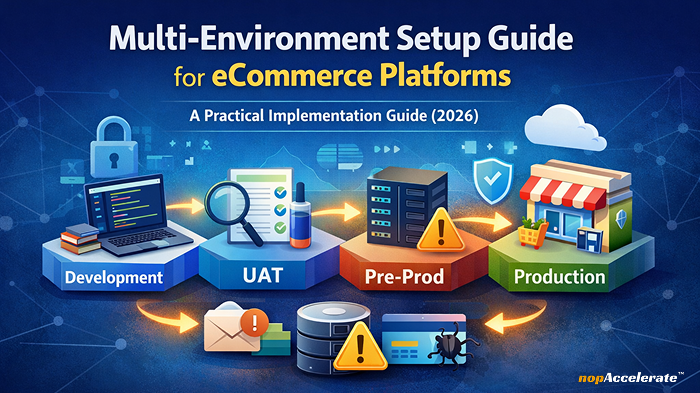







Managing multiple environments is a core part of running modern eCommerce platforms. Development, UAT, Pre-Production, and Production environments allow teams to build, test, and release safely.
Yet in real projects, these environments often become the source of the most confusing and expensive problems.
Teams experience issues such as:
When this happens, the default assumption is usually:
“There’s a bug in the code.”
In reality, most of these issues are not bugs at all. They are the result of how environments are set up, cloned, and maintained over time.
This guide breaks down where multi-environment setups fail in real eCommerce projects, it focuses on what actually happens in B2B, B2C and marketplace projects.
Why those failures often feel unpredictable, and what teams should explicitly verify at each stage to prevent them. The focus is not on tools, but on decisions and checks that matter in live deployments.
Multi-environment failures rarely come from a single big mistake. They usually grow out of small, well-intentioned shortcuts taken during setup or under delivery pressure.
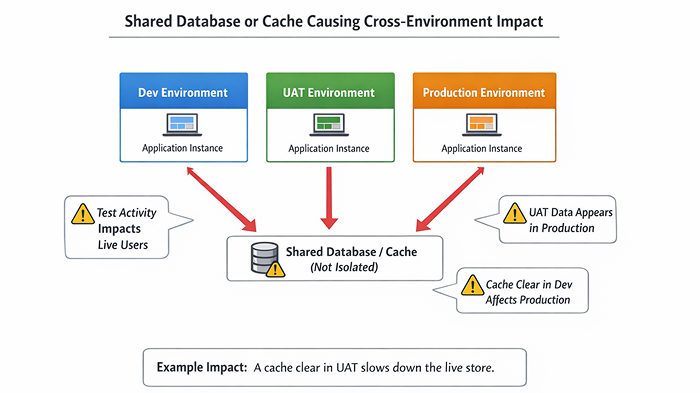
A shared resource is anything that looks isolated but isn’t.
This often happens unintentionally.
For example:
At first, everything seems fine. Pages load. Features work. No alarms go off.
Over time, problems appear:
These issues feel random because they don’t line up with deployments or code changes. Teams spend days debugging logic that isn’t broken.
While the real issue exists at the infrastructure or configuration level.
How these failures usually surface
What to verify in your environment
Copying production data into non-production environments is common and often necessary. The risk comes from what travels with that data.
A production database usually includes:
Real-world scenario
Nothing “broke”. The system did exactly what it was configured to do.
These incidents are rarely caught immediately. By the time someone notices, the damage is already done, trust is affected, and cleanup is painful.
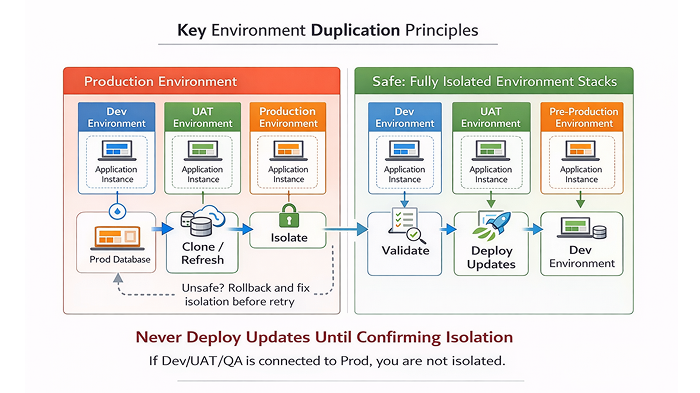
If there is one rule that determines whether multi-environment setups stay stable, it is this:
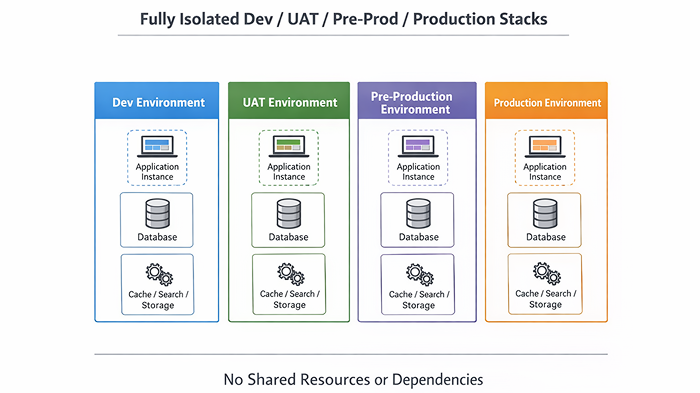
Every environment must be fully isolated.
What “one environment” really means
An environment is not just:
A real environment is a complete, independent system.
At a minimum, each environment must have its own:
| Component | Why it matters |
| Application instance | Prevents cross-runtime effects |
| Database | Stops data bleeding |
| Cache (Redis, etc.) | Avoids stale or mixed data |
| Search index | Ensures correct search results |
| Storage | Prevents file overwrites |
| CDN configuration | Avoids asset confusion |
| Credentials | Prevents real-world impact |
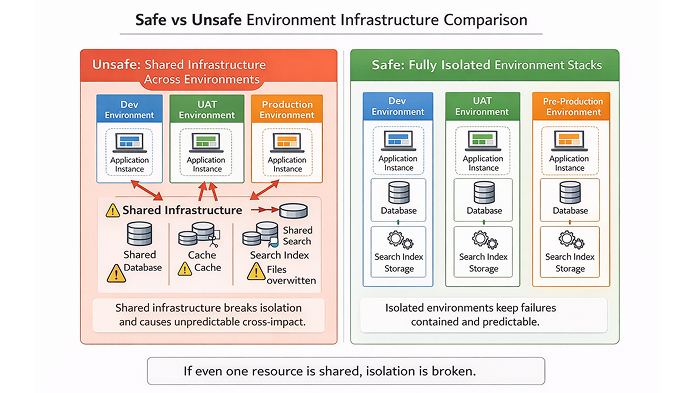
If even one of these is shared, isolation is broken.
Why shared services create “unpredictable” issues
Consider this scenario:
No deployment happened. No code changed.
From the team’s perspective, this feels like an unexplained production issue. In reality, the cache was shared, so the impact was shared.
True isolation removes this entire category of problems.
When environments are independent, failures stay contained and debugging becomes straightforward.
Even perfectly isolated environments will behave unpredictably if code and database versions don’t match.
Why this matters in practice
A common mistake is deploying the latest code against an older database snapshot.
Initially:
Later:
These issues are difficult to debug because nothing is clearly “broken”.
The root cause is misalignment: the code expects schema changes or configuration that the database doesn’t have.
Practical rule
Always clone environments from a known, tested combination of code and database.
If that combination doesn’t exist, rebuilding is safer than fixing forward.
Some environment mistakes don’t damage systems, they damage user trust.
Domain, URLs, and cache
After cloning, domain-related settings are often overlooked.
Typical problems:
This leads to:
What works in practice
Preventing accidental emails
Email is one of the highest-risk areas in non-production environments.
Triggers include:
If SMTP remains active after cloning, non-production systems can contact real users without warning.
Safe practices
If you didn’t explicitly configure email for that environment, assume it’s unsafe.
Even when application components are isolated, external services are often shared.
Infrastructure risks
Shared infrastructure causes subtle but damaging issues:
What works
After cloning:
Payment gateways and third-party services
This is where mistakes become expensive.
A single misconfigured credential can:
Non-negotiable rule
Scheduled tasks are dangerous because they:
What typically goes wrong
After cloning from production, scheduled jobs remain enabled:
These jobs run quietly and cause damage before anyone notices.
Practical safeguard
After every clone, review scheduled tasks and explicitly enable only what the environment needs.
Plugins often store:
These values don’t automatically adapt to new environments.
What teams miss
Re-saving critical plugin settings forces correct initialization.
File system stability
Many “random” runtime issues come from:
Symptoms include:
These are often mistaken for application bugs.
What to verify:
Most high-impact incidents are caused by people working fast in the wrong environment, not by system failures.
Access control
Common risks:
Simple controls make a big difference:
Visual environment indicators
When environments look identical, mistakes are inevitable.
A simple banner like:
“UAT – Do Not Use Real Data”
prevents irreversible actions more effectively than complex tooling.
Before using an environment seriously, validation is essential.
Smoke testing that actually matters
Minimum checks:
Failures here usually indicate setup issues, not feature bugs.
Logs, backups, and confidence
Before enabling schedulers or integrations:
This provides a safe recovery point and confidence moving forward.
Reliable environments don’t come from one-time setup. They come from a repeatable mindset:
Clone → Verify → Isolate → Disable Risk → Test
When something feels unpredictable, one of these steps was skipped.
Teams that adopt this approach:
Multi-environment issues rarely announce themselves clearly.
They show up as random bugs, inconsistent behavior, and problems that don’t align with deployments or code changes.
In most real eCommerce projects, the root cause isn’t faulty logic.
It’s small environment decisions made early, often under pressure, that quietly compound over time.
Teams that treat environments as fully isolated systems, validate them after every clone, and remove shared risk points don’t just avoid production incidents.
They gain confidence, release faster, and spend far less time firefighting problems that should never reach production.
Predictable environments create predictable outcomes.
Whether you need help fixing an existing setup, validating environments before go-live, or adding dedicated eCommerce resources to your team, we’re happy to help.
Feel free to reach out if you want a second expert opinion on your environment strategy.









Leave A Comment