Enjoyed this post?
Be sure to subscribe to the nopAccelerate newsletter and get regular updates about awesome posts just like this one and more!
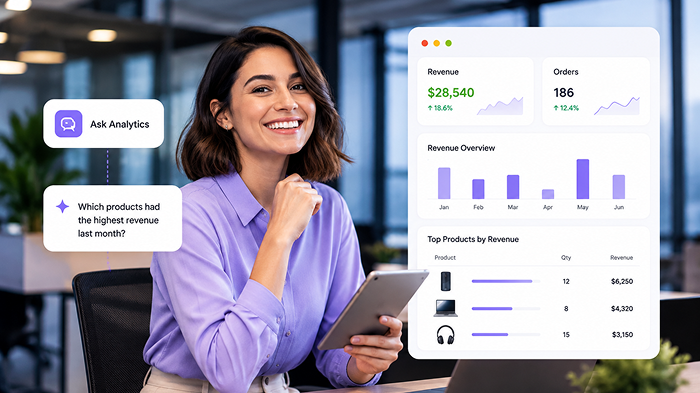







Your nopCommerce store already generates a large amount of useful data. The challenge is not always having the data but getting the right answer from it when you need to make a decision.
A standard report may show your sales, orders, customers, or products. But business questions are not always limited to predefined reports. You may want to know which products generated the most revenue last month, whether returns are increasing, or how new and returning customers are performing.
That is where a more flexible AI analytics approach can help.
nopCommerce AI Analytics brings dashboards, reports, live store data, Excel exports, and an AI Analytics Workspace into your nopCommerce admin. Instead of searching through different reports for every question, you can ask about your store data in plain English and get an answer.
But before choosing any analytics plugin, it is worth understanding how this approach actually works and what you should evaluate.
A useful analytics solution should do more than collect numbers. It should help you move from store data to useful information and then to a business decision.
When evaluating a solution for your nopCommerce store, consider whether it can help you:
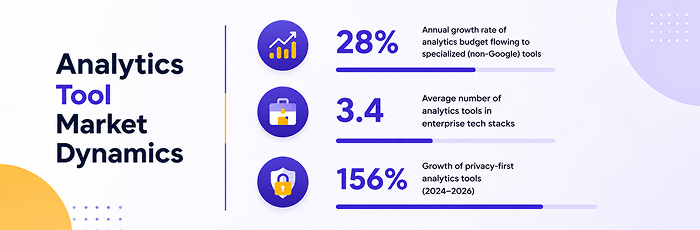
42% of enterprises use two or more analytics tools alongside GA4, showing how store teams often need more than one source to understand their data.
This is why a long feature list should not be the only thing you compare.
The more useful question is:
Can this solution help me find the information I need without making store analysis more complicated?
The main difference with AI analytics is how you interact with your store data.
Instead of starting by deciding which report to open, you can start with the question you want answered.
For example:
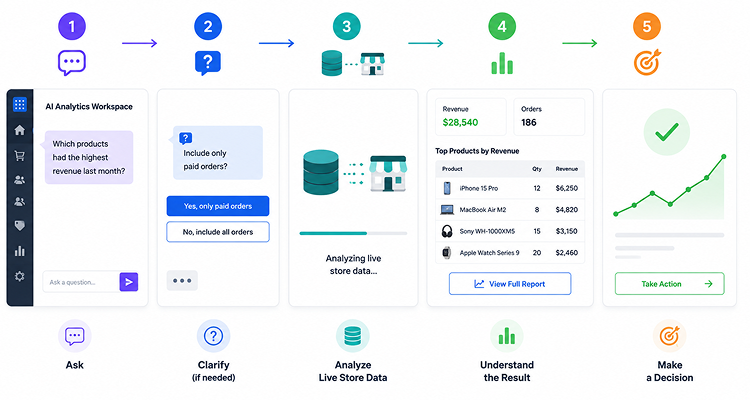
“Which products had the highest revenue last month?”
You don’t need to know which report contains this information or write a database query yourself.
Some questions can have more than one interpretation.
For example, revenue could depend on whether you want to include only paid orders or all orders. The AI Analytics Workspace can ask for clarification when additional details are needed.
That helps make the resulting analysis more relevant to the question you actually meant to ask.
The workspace translates the analytics request into a query that can retrieve the required information.
The important part here is that the analytics workflow is read-only. It is designed to retrieve and analyze store information rather than change your store’s transactional data.
The plugin reads relevant information directly from your nopCommerce store data, including orders, customers, products, carts, discounts, returns, and addresses.
There is no need to build a separate duplicate logging pipeline just to use the analytics.
Depending on the question, the workspace can provide a summary, key numbers, data tables, and optional charts so the information is easier to understand and use.
Instead of being limited to a fixed set of report templates, you can ask questions based on what you are trying to understand at that moment.
For example:
“Which products had the highest revenue last month?”
“Are returns increasing?”
“What were my sales by country?”
“Which category generated the most revenue?”
“What is my average order value over the last 30 days?”
“Show new vs. returning customer orders.”
These questions can come from different parts of your day-to-day store management.
A store owner may want a quick health check. A merchandising manager may want to understand which products or categories are performing. An operations team may need to investigate returns or order activity.
The point is not simply that you can “chat with AI.”
The useful part is being able to start with the business question instead of first finding the right report.
nopCommerce AI Analytics is an admin-only, read-only nopCommerce plugin designed to bring store analytics into one admin workflow.
It combines:
The plugin has three main admin screens.
The dashboard gives you a fixed view of important store metrics, charts, trends, rankings, and exports.
It is useful when you want to open your admin and quickly understand what is happening across your store.
This is where you ask questions about your store data in plain English. It is designed for questions that don’t necessarily fit into a fixed dashboard view.
This area lets you enable the plugin and configure the AI provider, model, API key, endpoint, token limits, timeout, default date range, and prompt-log retention.
Together, these screens provide regular reporting and more flexible analytics within the nopCommerce admin.
The dashboard is designed to give you a broader view of store performance without moving between multiple reporting areas.
The dashboard also includes operational indicators such as pending orders and cart activity.
Dashboard KPI summaries can also be exported to Excel for team reviews, leadership updates, or offline planning.
Analytics is only useful when it reflects the information you actually need to understand.
nopCommerce AI Analytics reads relevant store information directly from your nopCommerce database, including:
This means the analytics works with the data already being generated by your store rather than requiring a separate duplicate logging pipeline.
The data scope is focused on the nopCommerce store itself. External marketing or third-party data is not included.
When analytics connects to live store data, one of the first questions is naturally about what it can change.
nopCommerce AI Analytics is built to give you store insights without changing how your storefront operates.
The analytics experience is intended for authorized nopCommerce admin users with the appropriate plugin permissions.
There is no storefront analytics widget for customers.
The analytics workflow retrieves information for reporting and analysis. It does not write checkout data or modify store transactions.
Because the plugin is focused on admin-side analytics, it is designed not to interfere with customer-facing storefront behavior or order placement.
The workspace also includes controls around sensitive personal-data requests and prompt-log retention.
These details matter because analytics should give your team better visibility without becoming another system that needs to change how your store operates.
Analytics should give your team useful insights without adding unnecessary overhead to your admin workflow.
Several performance-minded controls help keep analytics requests manageable, including:
These controls help keep analytics requests manageable, particularly when working with larger amounts of store data.
Use the dashboard for regular store health checks, review revenue and orders, monitor customer activity, and export summaries for business reviews.
Explore sales, customers, products, categories, and trends when planning the next sales or marketing action.
Forbes reports that retailers using AI-enabled analytics for personalization and segmentation see 10–30% higher revenue and 15–22% lower customer acquisition costs.
Get answers to specific questions about orders, returns, sales regions, and other operational activity without writing SQL for every request.
Review top products and categories, along with sales breakdowns, to understand what is actually selling.
Get both fixed reporting and conversational analytics within the nopCommerce admin rather than manually building every query.
Before choosing a nopCommerce analytics plugin, ask:
If the answer to these questions matches what you need, nopCommerce AI Analytics is worth evaluating.
nopCommerce AI Analytics includes a free trial, so you can see how the dashboard and AI Analytics Workspace fit into your own nopCommerce admin workflow before making a purchase decision.
You can explore your store information, review the reporting experience, and ask questions in plain English.
See your data. Ask your questions. Review the results. Decide if it fits.









Leave A Comment